

Premiere Pro to Audition Sending Only Single Waveform Not Multitrack
I am attempting to edit the audio of my video in Audition, but when I send from Premiere to Audition it only shows as 1 single master waveform in the "Waveform Editor" panel. It does not open or show up in the "Multitrack Editor" panel.
Here is my process, maybe I am missing something:
While in Premiere, I right-click the sequence in the project panel. Click "Edit in Adobe Audition" then "Sequence"
In the "Edit in Adobe Audition" pop up my settings are as follows:
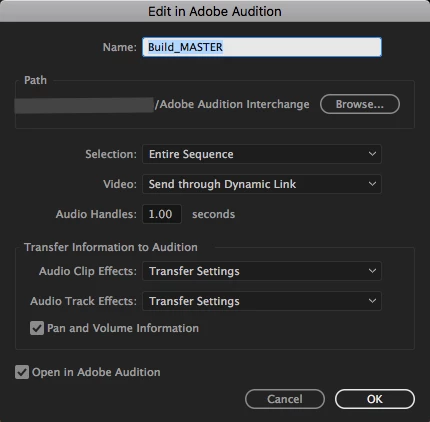
I click "OK"
It "Prepares Sequence Data" and then loads into Audition. Audition opens up and the "Waveform Editor" has 1 single track in it that has all the audio tracks "flattened" into one waveform track.
Going to the "Multitrack Editor" panel, it is empty. And I am unable to edit my audio.
All the tutorial videos I have followed show same steps but result in multiple tracks in the "Multitrack Editor" panel. I think I might be doing something wrong, or a setting is off. All my programs are up to date with the lates Adobe CC updates as of this posting. Please help. Thank you.


 AdChoices