
Participant
December 12, 2019
Answered

Preset time to two seconds before and after voice starts

  • December 12, 2019
  • 1 reply
  • 359 views

I have several audio recordings that I need to homogenized. In every recording there is a person saying something. Before the person starts talking and after the person is done talking there is a silence that lasts variably for 3 to 8 seconds. I need that to be 2 seconds before and two seconds after. Is there any way to create a preset feature that would help me with this? I mean without having to do it manually. I'm new to Audition, I will appreciate any help I can get.

Thanks!
This topic has been closed for replies.
Correct answer SteveG_AudioMasters_

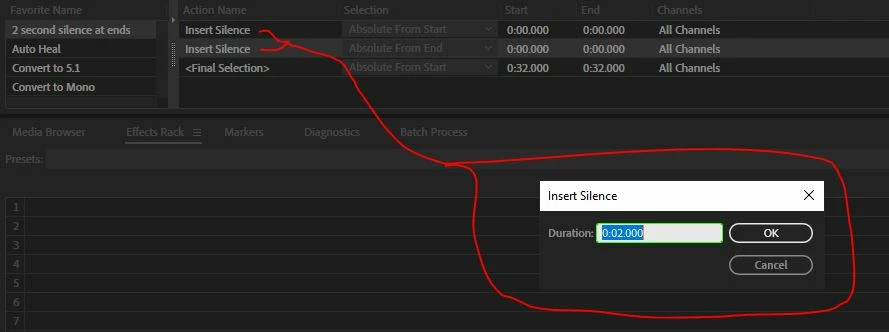
You have to create the favorite yourself by recording all the keystrokes you need to do this on a single file. It may take you a couple of goes to get this right, and you may have to edit the result (I don't recall whether I had to or not when I created this previously). What it should look like when it's finished is easier to show, though:

When you click on either of the two 'Insert Silence' boxes, you should see two seconds indicated in both. If you don't get this quite right, then you can edit the boxes. The 'Absolute from Start' (and End) are important, but it doesn't matter too much about the final selection number - this just determines where the cursor will end up.

1 reply

SteveG_AudioMasters_
Community Expert
Community Expert
December 12, 2019

I don't think that you will be able to do this automatically. Audition has the ability to recognise silence, but it cannot distinguish between silence at the start or end, and any other silences - like between words, for instance. Without this, there is no way to automate the process. If you remove the silences at the start and finish manually, then it's perfectly possible to create a favourite that would insert two seconds of silence automatically for each file in a batch process - although since you'd have to do the first part manually, you might just as well finish the process each time with the favourite.

ZoeSofiaAuthor
Participant
December 12, 2019

Thanks for your reply! To clarify then, for each file I would have to:

  1. Manually delete the silence before the person starts talking and right when they are done.
  2. Create a favorite that would insert two seconds of silence.

Could you give me a reference for how to create the favorite?

Thanks again!

SteveG_AudioMasters_
Community Expert
SteveG_AudioMasters_Community ExpertCorrect answer
Community Expert
December 12, 2019

You have to create the favorite yourself by recording all the keystrokes you need to do this on a single file. It may take you a couple of goes to get this right, and you may have to edit the result (I don't recall whether I had to or not when I created this previously). What it should look like when it's finished is easier to show, though:

When you click on either of the two 'Insert Silence' boxes, you should see two seconds indicated in both. If you don't get this quite right, then you can edit the boxes. The 'Absolute from Start' (and End) are important, but it doesn't matter too much about the final selection number - this just determines where the cursor will end up.