





Answered
Radio Industry Cart Chunk, Metadata, Export in Multitrack
- How can I get Audition to provide the proper metadata (Song Title and Artist) for that song's section of the 2-hour show WAV?
- How can I get Audition to pull in and use the metadata embedded in each song WAV?
- (This might be answered by Number 1) How can I create and get Audition to provide the proper metadata and start/stop times for the talk spots?
I produce a weekly music and talk radio show/podcast consisting of 23-27 songs with talk spots and an intro and outro. The podcast is distributed to radio stations and distribution systems as a single 2-hour WAV and 320kbps MP3. For reporting and royalty payment purposes, I need to provide the track list for each show, and should timestamp each track. Providing the track list is easy, but getting Audition to display the meta manually doing timestamps is a P.I.A. I'm hoping there's an automated or semi-automated way to create and embed something like a CUE Sheet or Cart Chunks in Audition that lands in the exported WAV and/or MP3.
FYI:
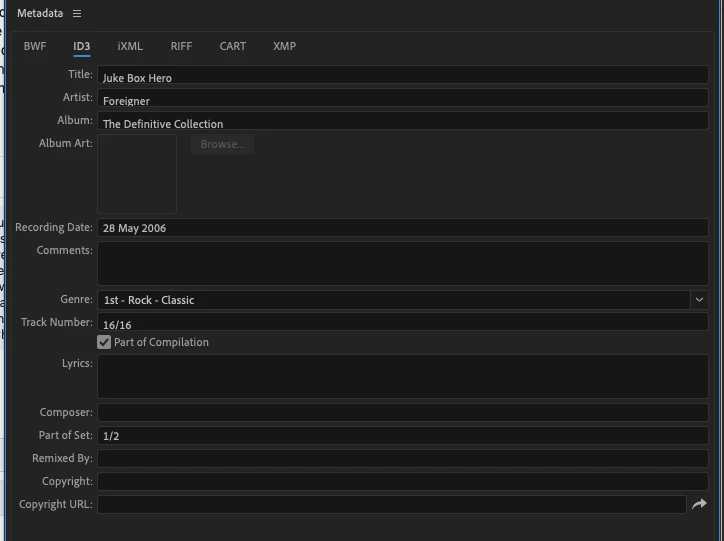
- All the WAV songs I include have full metadata when I place them into multitrack.
- I export to MP3 via Adobe Media Encoder (File > Export > Adobe Media Encoder).
- I'm not averse to plugins/extensions for Audition if that's the solution.
Attached screenshots:
- Multitrack view of creating the show.
- Showing the metadata already embedded in one of the show's songs.

 AdChoices