
Inspiring
Oct 20, 2018 1:57 PM UTC
Question

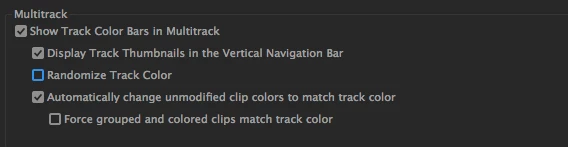
Randomize Track Color

Unless I'm missing something, it appears the Randomize Track Color option has been removed in Audition 2019/Appearance? Personally I don't care for multi-tracks populated with randomly selected funky colors. I realize how others might find it efficient. I would prefer a static color option allowing for possible customization after creation. All subjective, of course. I've sent feedback.

-paul.

@produceNewMedia
    This topic is closed to new replies. Start a new post to keep the conversation going.

    6 replies

    gunthre
    Participating Frequently
    Oct 31, 2018 2:33 PM UTC

    I personally add a lot of tracks randomly from project to project and a template is a limitation...

    Translate
    Paul_Ferguson
    Inspiring
    Dec 18, 2018 7:37 AM UTC

    Why do you think templates limit?

    Translate
    Paul_Ferguson
    Inspiring
    Oct 21, 2018 10:40 PM UTC

    "I would prefer a static color option allowing for possible customization after creation."

    Me too.  Especially if that static default was monochrome.  Like ry lark says, templates are how you customise it.

    Translate
    ryclark
    Participating Frequently
    Oct 20, 2018 9:02 PM UTC

    You can already select and change to any track colour you like by right clicking on the colour bar at the left of the track header and selecting a colour from the colour swatch pane that opens..

    Translate
    paulfiggAuthor
    Inspiring
    Oct 20, 2018 9:19 PM UTC

    ryclark  wrote

    You can already select and change to any track colour you like by right clicking on the colour bar at the left of the track header and selecting a colour from the colour swatch pane that opens..

    Sure. But you're missing my point. Deactivating the legacy Randomize preference resulted in multiple tracks created with a static color. The user could then customize individual tracks if necessary. In fact I hardly ever deviated. Occasionally for efficiency purposes I would apply custom colors to certain random tracks. Since the preference has been removed, the user is now forced to accept the baked in color randomization. There is no option or method to default to a consistent or static color when creating multiple tracks. It must be done (unless I'm missing it)  on a track by track basis. It's way too tedious IMHO.

    -paul

    @produceNewMedia

    Translate
    ryclark
    Participating Frequently
    Oct 21, 2018 11:09 AM UTC

    Well you if you have a favourite colour scheme for your track layout you can always save it as a template for future use. I never really saw the use for the Randomize Track Color feature anyway and you didn't seem to use it yourself. Much better to have a custom track colour layout is  common across each new session that you get to know which tracks are which surely?

    Translate