
juanpablo_ayala
Participant
October 9, 2017
Answered

Raw data import - random parts of noise?

  • October 9, 2017
  • 2 replies
  • 912 views

Hello, guys. So, the dreadful 0 bytes file thing happened to me. My Tascam lost power during the recording. I left the SD card untouched and made an image copy of the drive so I could import it in Audition as raw data in order to find the corrupted take.

My input settings were 48khz, 24 bit PCM, Stereo (just as recorded) and Little Endian. I have tried values 0, 1 and 2 (even 3) in the "start byte offset" space.

What I get is an almost 4-hour long audio file with 85% ultra-saturated sound at 0db (or almost) and the other 15% are chunks of good audio with normal levels. Where levels are just a little below 0db I can tell those are takes that I recorded just fine--Apart from this one take I'm trying to recover, I can play all other files on my computer and they all have normal levels (all of them 48khz, 24 bit, stereo).
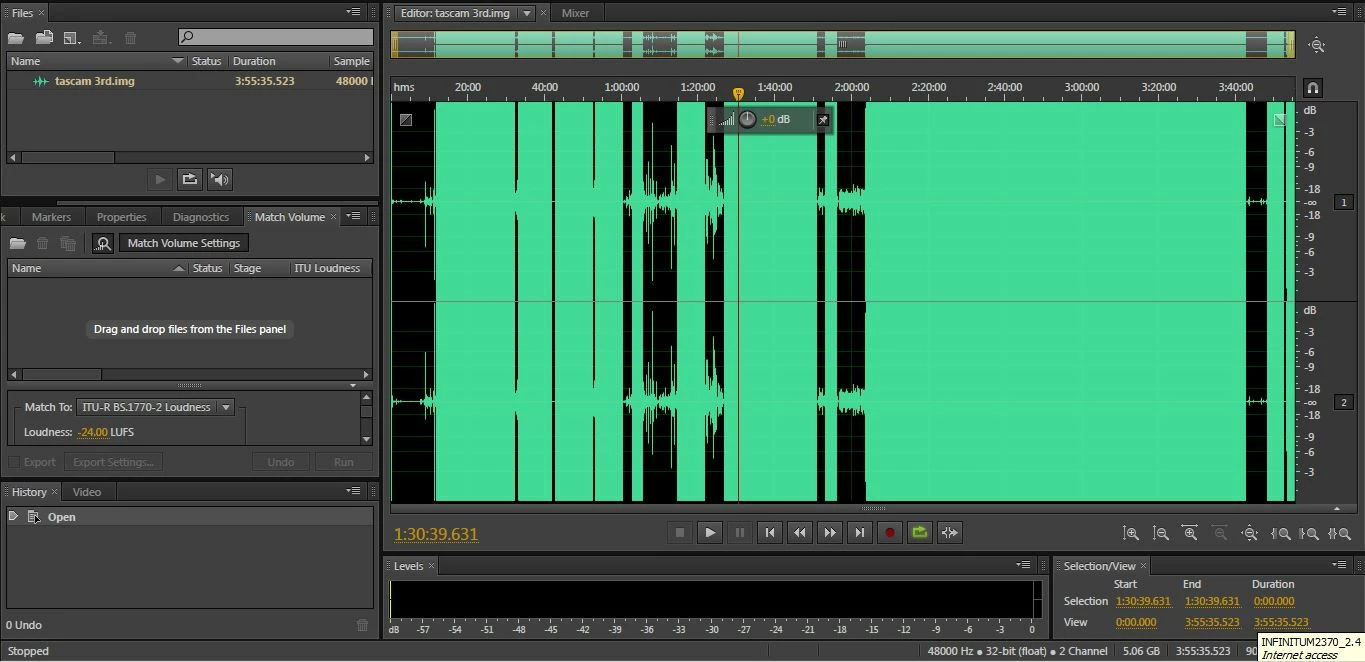
When I change the value to 0, 1 or 2 the chunks that sound good are all different, but still, together they comprise about 15% of the entire file. When I changed the value to 3 I got a split second file.

Anyone can help me? Thanks in advance.

PS: I have also tried the chkdsk solution to recover the 0 bytes file, but the .chk files are not showing up on my drive event though the "show hidden files" option is checked.

This topic has been closed for replies.
Correct answer ryclark

You might, if nothing on the SD card has been overwritten, recover the contents with one of the SD card manufacturer's rescue apps such as Sandisk RescuePro.

Data recovery for memory cards and flash drives

2 replies

Anthony Caruso
Participant
April 17, 2019

lol so because the issue is 2 years old it makes it irrelevant?

SteveG_AudioMasters_
Community Expert
Community Expert
April 17, 2019

https://forums.adobe.com/people/Anthony+Caruso  wrote

lol so because the issue is 2 years old it makes it irrelevant?

Pretty much, yes. We heard no more from the OP, so we have no more to go on. And anyway, his question was 'Anyone can help me?' so there was nothing irrelevant about ryclark's response at all. If there was anything more relevant to add, it would have been. There wasn't at the time, so nothing was added.

ryclark
ryclarkCorrect answer
Participating Frequently
October 10, 2017

You might, if nothing on the SD card has been overwritten, recover the contents with one of the SD card manufacturer's rescue apps such as Sandisk RescuePro.

Data recovery for memory cards and flash drives

Anthony Caruso
Participant
April 17, 2019

I don't think you answered his question.....it's not even a solution to what he was asking.....:(

SteveG_AudioMasters_
Community Expert
Community Expert
April 17, 2019

https://forums.adobe.com/people/Anthony+Caruso  wrote

I don't think you answered his question.....it's not even a solution to what he was asking.....:(

And I don't think you read the date on this thread...