Studio Brandaris
Known Participant
July 18, 2025
Answered

recording audio from internet on my PC

  • July 18, 2025
  • 2 replies
  • 539 views

Previously, I could record music from the internet with Audition. After reinstalling Windows 11, it's no longer working. When I go to Audition Preferences > Audio Hardware, I only see either System Default - No Input or No Input. I think I used to have a choice of Stereo Mix, but I don't see that anymore. Is there a way to record audio again (sound card NVDIA IPS235)?

Correct answer Averdahl

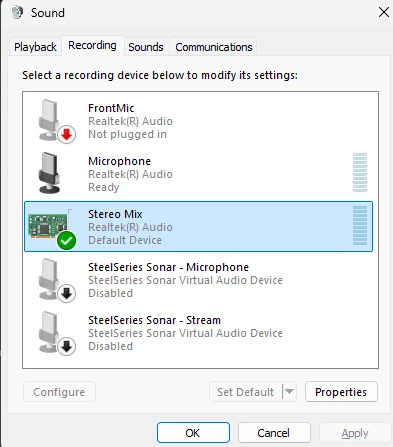
In Windows i go to the Start menu and type in change system and then click on Change System Sounds. In the window Sound i click the Recording tab and set the Stereo Mix to the Default Device and then click OK.


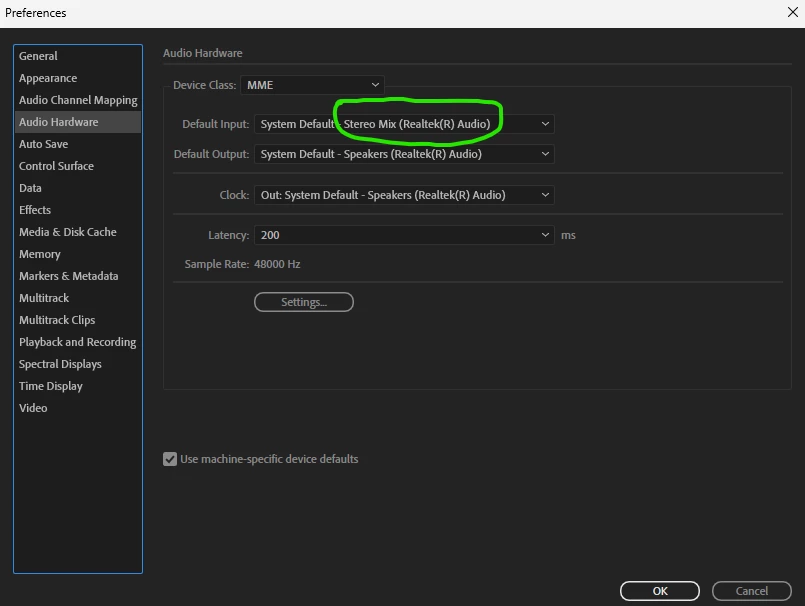
In Audition, go to Edit > Preferences > Audio Hardware and set the Default Input to Stereo Mix and click OK. Now the volume control on your computer dictates what comes in to Audition. Low volume=Low input to Audition and high volume=high input to Audition.


This works for me but it has been hard sometimes to get all parameters correct to make it work.


quote

Previously, I could record music from the internet with Audition. After reinstalling Windows 11, it's no longer working. 


By @Studio Brandaris


2 replies

Averdahl
Community Expert
AverdahlCommunity ExpertCorrect answer
Community Expert
July 18, 2025

In Windows i go to the Start menu and type in change system and then click on Change System Sounds. In the window Sound i click the Recording tab and set the Stereo Mix to the Default Device and then click OK.


In Audition, go to Edit > Preferences > Audio Hardware and set the Default Input to Stereo Mix and click OK. Now the volume control on your computer dictates what comes in to Audition. Low volume=Low input to Audition and high volume=high input to Audition.


This works for me but it has been hard sometimes to get all parameters correct to make it work.


quote

Previously, I could record music from the internet with Audition. After reinstalling Windows 11, it's no longer working. 


By @Studio Brandaris


Studio Brandaris
Known Participant
July 24, 2025

I tried your solution, but in my windows version I can't find stereo mix. See my answer above. Thanks for helping me. 

Averdahl
Community Expert
Community Expert
July 24, 2025

You wrote that your sound card is NVIDIA IPS235 and when i do a Google search for that it returns a bunch of computer monitors instead of a sound card. I have never tired to use my monitor as the sound card, but it may work if you in Windows 11 go to Settings > Sound > All sound devices > Properties and under Audio change it from "Don´t allow" to "Allow". This may allow apps to use this device.


But personally i would use the audio device on the motherboard for recording audio. Settings > System > Sound is a good place to start to see what aviable input devices you have.

quote

I tried your solution, but in my windows version I can't find stereo mix. See my answer above. Thanks for helping me. 


By @Studio Brandaris


SteveG_AudioMasters_
Community Expert
Community Expert
July 18, 2025

If the operating systemt has taken this away from you, it's not Audition that you need to be looking at, but the way your sound settings are working. With W11 though, you may get nowhere. I gave up trying to use Audition to record streams a long time ago, and use a proprietary (not expensive) app called SoundTap to do the job - other similar apps are available. This generally works pretty well.

Studio Brandaris
Known Participant
July 24, 2025

Hi SteveG

I will try your solution. it's the easiest way to solve the problem. I tied also the solution of Averdahl, but that doesn't work for me. I have a Dutch sytem, but in translation the searching doesn't work and if I type stereo mix Windows has not hit. Thank you for solving my problem.