Known Participant
January 28, 2020
Answered

Recordings sometimes contain a momentary glitch, or time skip. Looking for advice.

  • January 28, 2020
  • 3 replies
  • 2490 views

I'm not sure what part of my system I should be suspicious of.   I use Audition to record so I'm posting it here, though it could surely be any other system factor responsible.  


I get a recording that has a glitchy skip where time is lost, however brief fraction of a second.  Or it is a super rapid digital sounding loop for just a brief moment, you probably know what I mean.  It's like you asked the computer a really hard math problem in the middle of recording.. it must doing something else for a moment.  It could be a 5 minute recording or an hour long one.  It doesn't happen every since recording.  


I tried putting the laptop in airplane mode in case it was internet related.  Inconclusive.  

I'm not using any VST realtime processing software on the input.  Recording with Audition.


Dell XPS15, 32GB RAM, 1 TB (25% full) a year or so old

Win10 64bit

Steinberg UR22   (too-cheap interface?)

Adobe Audition 12.1.5.3

Cubase Elements 10 (not used these recent problem cases)

All my software is legit, no weird stuff.


What would you look at/do, to ensure the system has minimal background stuff happening, so the recording can be captured without any weird stuff?  I'm still new to Win10.


Grateful for any ideas, Audition/Windows/other related,

J
This topic has been closed for replies.
Correct answer SuiteSpot

Hi SuiteSpot, thanks,

I found that the waves item is a Dell-included software connected to the realtek audio drivers. 

For whatever that is worth.  I'll try disabling those items you suggested, thank you.


I'm using an external USB interface to record, Steinberg UR22.


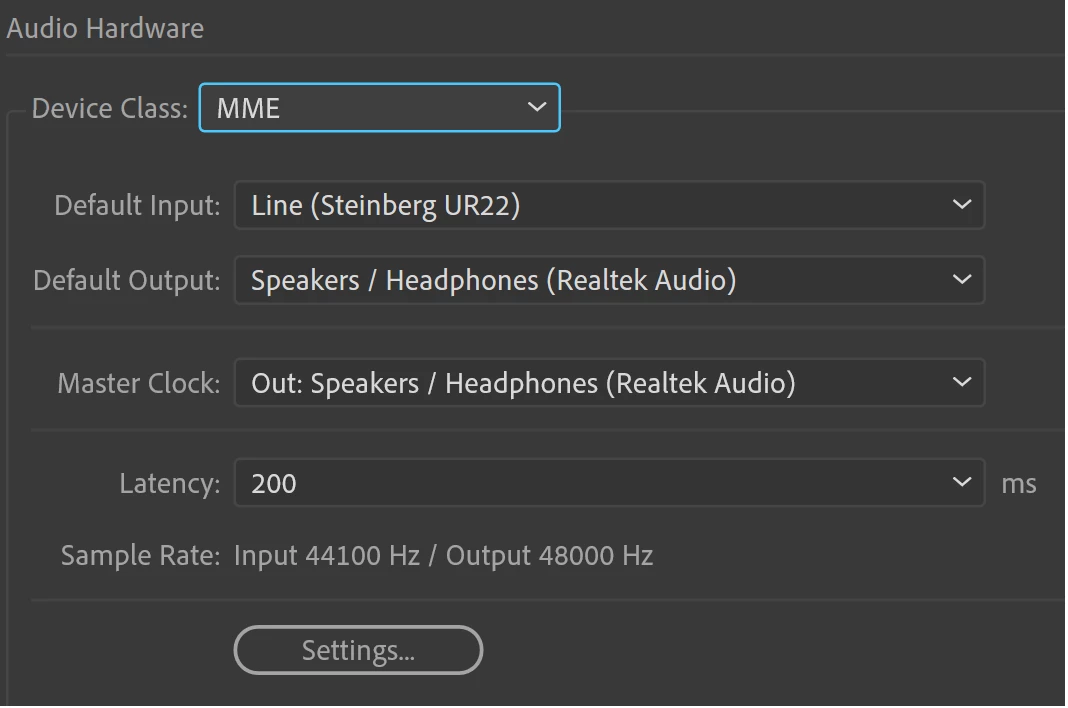
Since you mentioned it, I looked and realized Audition has MME selected. 

I have always used it like this.. I record with the Steinberg UR22, and play back through internal speakers. 

Or, sometimes I will set Default Output also to UR22, if Im connected to speakers. 


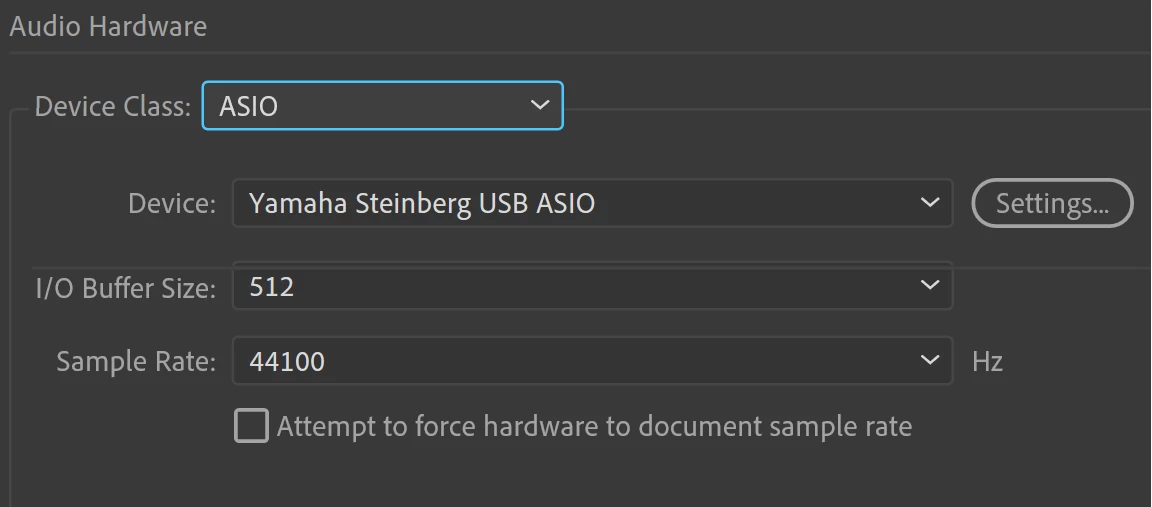
I can change that to ASIO


I looked for some windows control panel audio device settings too, but I found nothing about ASIO.    


I also uninstalled a couple older versions of Audition (2018,2019).  So I am using the 2020 version.  


And uninstalled an unused copy of Cakewalk Sonar. 

Considering uninstalling a seldom used copy of Guitar Pro, but I don't want to go too crazy.  


I'll give it another try and see what happens. 

Thanks again for the feedback.  


Yep, in Audition, select ASIO for your Yamaha device

Uninstalling unused software is not going to make a difference - that is just freeing up hard disk space which should not be the issue in this case

3 replies

Known Participant
March 21, 2020

I recorded a nice session in Audition, Dell machine in airplane mode, with Windows Defender/Firewall disabled, and it still recorded with digital skips.  


This is what's in my Startup, I don't see anything crazy in here.  "Killer" is my dynamic network adapter, not sure why it's disabled.  I would suspect Waves, but I think my machine was doing this before I even bought any Waves plugins.


(image uploaded)


Does anybody know if this setting is normal?

(image uploaded)


Or any other Audition settings to look at..

Audio Disk Cache is C:\Users\xxx\AppData\Local\Temp\Adobe\Audition\12.0, seems reasonable.


I hate my Dell so much.  How can it still capture glitches in airplane mode..  Drive C has 678 GB out of 952GB free, no defrag needed.  

Thanks for reading.  

SuiteSpot
Inspiring
March 21, 2020

I would disable Waves, Realtek, Windows security & HD Audio background process while recording.

I assume you are using some other audio interface to record with and not the onboard sound card?
I also assume you are using an ASIO audio driver?
Also if it is a solid state drive then you probably shouldn't be defragging it.

Known Participant
March 21, 2020

Hi SuiteSpot, thanks,

I found that the waves item is a Dell-included software connected to the realtek audio drivers. 

For whatever that is worth.  I'll try disabling those items you suggested, thank you.


I'm using an external USB interface to record, Steinberg UR22.


Since you mentioned it, I looked and realized Audition has MME selected. 

I have always used it like this.. I record with the Steinberg UR22, and play back through internal speakers. 

Or, sometimes I will set Default Output also to UR22, if Im connected to speakers. 


I can change that to ASIO


I looked for some windows control panel audio device settings too, but I found nothing about ASIO.    


I also uninstalled a couple older versions of Audition (2018,2019).  So I am using the 2020 version.  


And uninstalled an unused copy of Cakewalk Sonar. 

Considering uninstalling a seldom used copy of Guitar Pro, but I don't want to go too crazy.  


I'll give it another try and see what happens. 

Thanks again for the feedback.  

SteveG_AudioMasters_
Community Expert
Community Expert
January 28, 2020

I@m really not sure what's going on with this, but there have been a number of reports recently about similar things that have started since the last update - look at this thread for instance. SuiteSpot's advice is good - but there are other ways you can optimise machines for audio, and it's well worth checking those out too. A Google search reveals quite a lot of options: Google search about optimising Windows10 for audio 

Known Participant
February 14, 2020

update: 

I've been putting Win10 in airplane mode some more, lately, when I have to record something longer than a couple minutes.  It seems to have increased my luck!    (haven't noticed surprise glitches in the audio)


So I'm more convinced it is windows going on the internet, and the Dell bogs down and audio hiccups.  I'm not sure I should be disabling parts of Windows Defender though, and I read McAffee doesn't work on Win10, so Defender might be what I'm stuck with (assuming Defender is the glitch maker).


It will happen recording into Cubase, into Audition, playing back from Audition, Media Player, YouTube, pretty much any audio.  Real bad problem for a fancy laptop to have.

SuiteSpot
Inspiring
February 14, 2020

Forget McAffee it is more of a virus as it digs itself in like a bush tick - Windows Defender is all you need but of course you can disable that and disconnect from the internet while recording without issue IMO.

Clearly there is more going on in your machin\e in the background than is good for a PC used for recording 😉

SuiteSpot
Inspiring
January 28, 2020

Press Cntrl Alt Delete and select Task Manager

There you can see what else is loaded and running in the background

From there you can disable things that don't need to run at startup

It is a bit like brain surgery so don't just start hacking about in there 😉


Look at things like 3rd part anti-virus applications and apps that are constantly looking for updates orinternet related stuff