
Known Participant
April 19, 2018
Answered

Removing the bar below the timeline

  • April 19, 2018
  • 1 reply
  • 291 views

Through some "mis-click," a separate bar appeared below one of the timelines in the multitrack (shown below). I would like to get rid of it, but despite searching all over for what I'm is an easy solution, I haven't found it. Help please? 
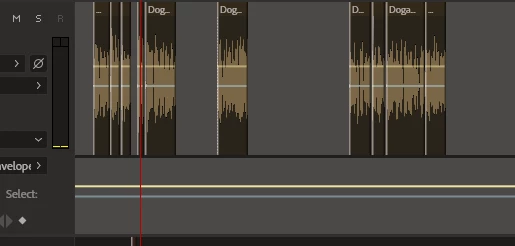
Thanks

Steve
    This topic has been closed for replies.
    Correct answer SteveG_AudioMasters_

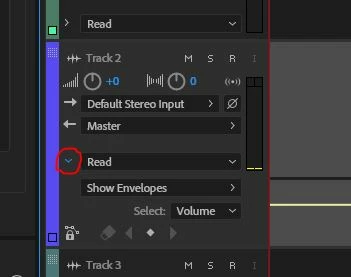
    You just need to click on the twirl-down next to the 'read' automation box:

    I've circled it in red. Clicking on it will make it twist back, and the automation line will disappear.

    1 reply

    SteveG_AudioMasters_
    Community Expert
    SteveG_AudioMasters_Community ExpertCorrect answer
    Community Expert
    April 19, 2018

    You just need to click on the twirl-down next to the 'read' automation box:

    I've circled it in red. Clicking on it will make it twist back, and the automation line will disappear.

    riversurfAuthor
    Known Participant
    April 19, 2018

    Thanks!