
Participant
May 10, 2017
Answered

Removing VST from Effect List

  • May 10, 2017
  • 3 replies
  • 2664 views

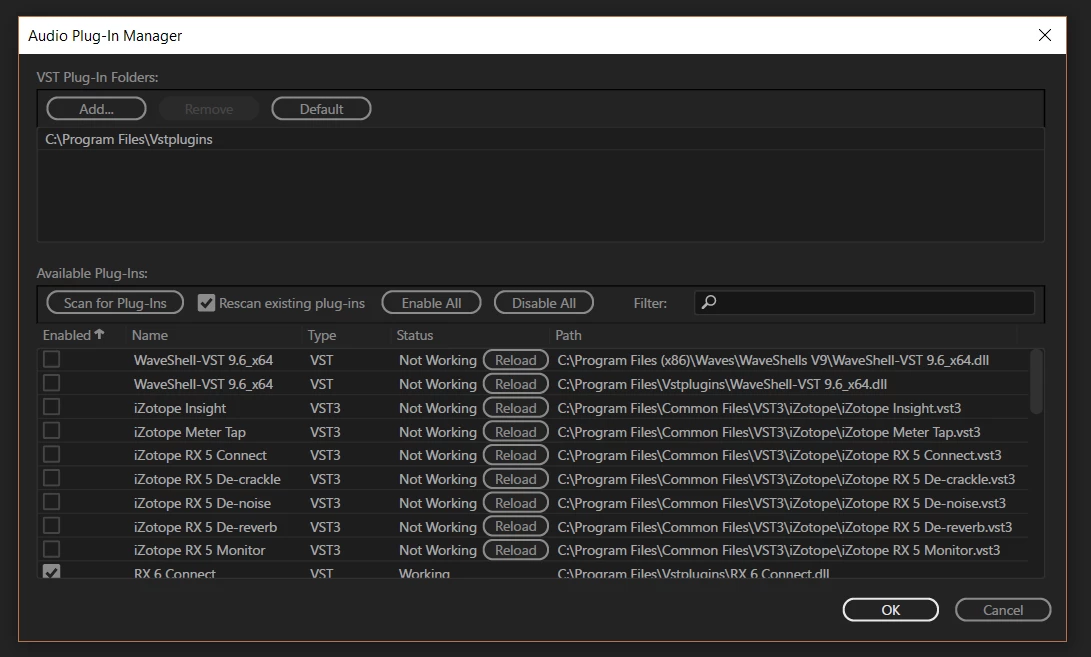
I no longer have VST effects that are listed in Audition CC

For whatever reason they are still showing up under my effect list and they won't go away.

I reset the folders to be displayed, and still they are trying to show up.  I cannot get rid of them in anyway.  Those .dll's and vst3 files do not even exist in the folders that they are trying to point to.

Thoughts??
This topic has been closed for replies.
Correct answer joeh36992789

Looks like I fixed it.

Thank you all for the help.

After removing all folders from being searched everything still came back up.  I went ahead and hit "reload" again after that and it scanned for that particular plugin, and when it wasn't there, it just removed it.

Weird that it wouldn't do it before, but hey, it's fixed.

It had no bearing on functionality of other plug-ins, just my OCD and wanting to keep everything neat.

3 replies

joeh36992789AuthorCorrect answer
Participant
May 11, 2017

Looks like I fixed it.

Thank you all for the help.

After removing all folders from being searched everything still came back up.  I went ahead and hit "reload" again after that and it scanned for that particular plugin, and when it wasn't there, it just removed it.

Weird that it wouldn't do it before, but hey, it's fixed.

It had no bearing on functionality of other plug-ins, just my OCD and wanting to keep everything neat.

Inspiring
May 11, 2017

Cool!  Good work.

OCD?  Just sounds sensible to me... why live with all that clutter?

Participant
May 11, 2017

Hey MusicConductor.

Yeah if I "scan for plugins" they still come up.  When I meant by reset the folders, I meant went back to the default folders and they still showed up.  The files that are "not working" don't even exist anymore!

ryclark
Participating Frequently
May 11, 2017

What happens if you remove all Plugin Folders from the top box and do a rescan without any folders listed. Hopefully this would clear out all VSTs. Then you can reset to Default folders and rescan for the ones that are actually there.

Alternatively you could go to the Audition's Settings folder and rename (or delete) the AudioPluginManagerSettings.xml file. Audition should then create a new empty default file when it next opens so that you can rescan your Vsts from scratch.

Inspiring
May 10, 2017

If you hit "Scan for plugins" again, do you still get the same result?  And what do you mean by a "reset" of the folders?  If they still exist, Audition's going to look for goodies in them, so hopefully "reset" means deleted or uninstalled.