

DM3DXYZ
Participant
December 7, 2020
Question

Replacing Offline Media Removes Edits

  • December 7, 2020
  • 3 replies
  • 487 views

I'd like to report a huge bug... 


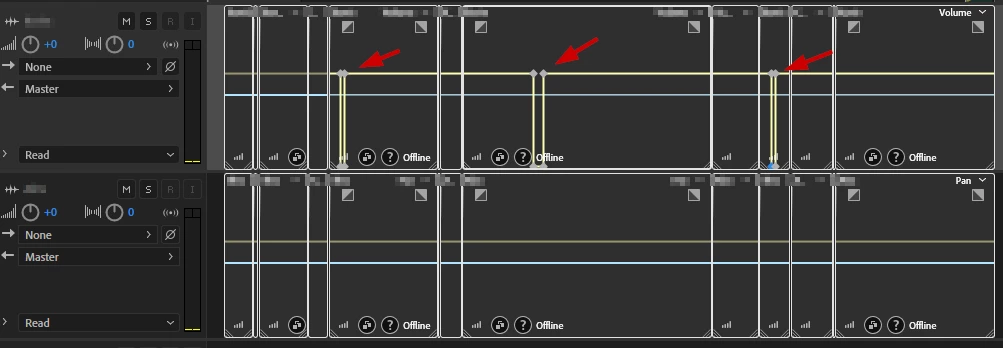
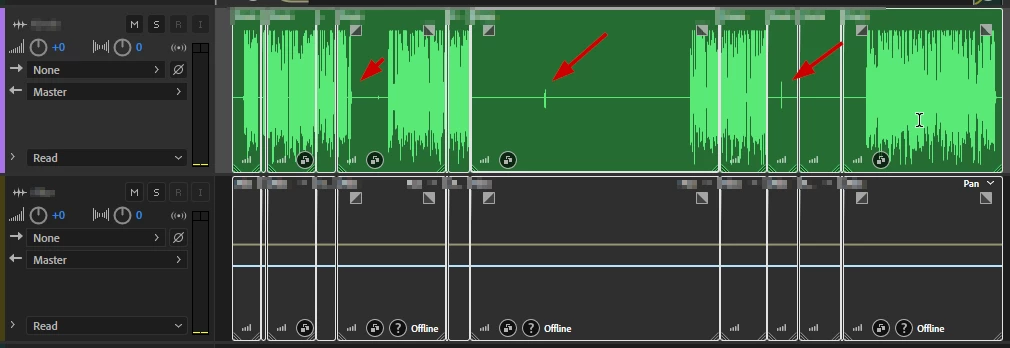
Opened a project to find that all the media had been offline and so when I linked it back up, I noticed that all my keyframes/edits to volume were lost in the multitrack session. I have audio that is 1+ hours long and would really hate to have to RE-EDIT the entire thing..


Images for reference:

Offline Media:
After Linking Audio:
 

This topic has been closed for replies.

3 replies

Participant
December 30, 2021

I am having the same issue. How can I tell if the file is corrupt? Or did someone find a fix?

SuiteSpot
Inspiring
December 30, 2021

Open the sesx in a text editor (make a backup first) or email it to me at the address in my last post

SuiteSpot
Inspiring
December 8, 2020

The sesx (session file) contains the keyframe edits 

If the media is offline and you relink that does not affect the keyframe edits.

It could be as SteveG suggests you may have a corrupted sesx

You can email it to me (info@aatranslator.com.au) and I will have a look if you like

Participant
December 30, 2021

I am having the same issue. How can I tell if the file is corrupt?

SteveG_AudioMasters_
Community Expert
Community Expert
December 7, 2020

Are you sure? My problem with your second screen shot is that I can't see any volume envelope at all on the top track. If you twirl down the arrow to the left of 'Read', you'll immediately get to a list of displayed envelopes. Is there a check beside Volume?

DM3DXYZ
DM3DXYZAuthor
Participant
December 7, 2020

Interesting, 

Before: 

After Linking Audio:


Noticing that the top right corner is missing the dropdown.. I also tried to re-toggle the envelopes. 

SteveG_AudioMasters_
Community Expert
Community Expert
December 7, 2020

I'm presuming that you didn't store the session audio with the session file, in a folder of its own, and that the previous audio file location was not available when the session was reopened. If those statements aren't correct, then you possibly have a corrupted session file...