Thanks, here it is: Dropbox - Intro Music_End.wav
Well, I know what's going on - it's a combination of things! What you have to bear in mind is that Audition will reverberate every single thing after the marker, and if they happen to have scratchy bits and clicks in them, then they get reverberated just as much as the music. The real killer in your example though was at the end - where you haven't ended up on a zero-crossing and consequently added a click that wasn't there at all to start with! But it's not the only issue; I've marked the others as well (only on one channel) in this screen-grab:
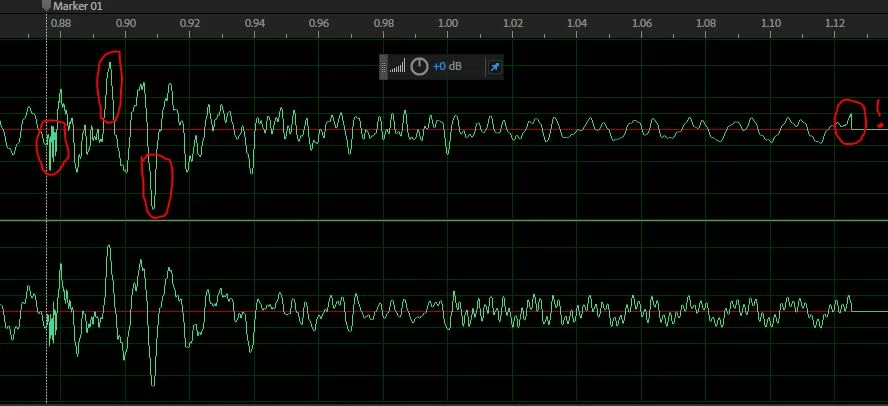
The first bit is a 'scritchy' noise which I highlighted and used the Auto-heal favourite on. The next two bits I highlighted and simply reduced the amplitude of with the HUD. The zero-crossing error (marked with a !) I simply edited out, so that the music ended on a zero-crossing, which eliminated the 'click' you get otherwise. I only did this quickly - you can probably do better if you have a go at it yourself. The key to the whole thing is that if you want a smooth result, you need a smooth source - so that's what you have to do. Other options are to start the effect ever so slightly later (after the first three glitches) and just fix the zero-crossing error. Using your start point, I get this: Dropbox - Intro Music_End_fixed.wav and if I move the start point ever so slightly further towards the end and just fix the zero-crossing error, I get this: Dropbox - Intro Music_End_fixed_again..wav . Bottom line; you have to be really careful what you select to do this!



 AdChoices