Participant
Jan 29, 2017 4:38 PM UTC
Answered

Save a Custom Sine Wave to a File

I am trying to generate a specific sine wave to play on other devices.  All I seem to be able to do is generate an effect or a filter. :-

This topic is closed to new replies. Start a new post to keep the conversation going.
ryclark
ryclarkCorrect answer
Participating Frequently
Jan 30, 2017 4:42 PM UTC

I don't see an asterick.


GregNH wrote:

I had Audition years ago and was able to generate all kinds of noise files for acoustic testing purposes.  I wish I had that today.  This is useless for me

It does and you do.

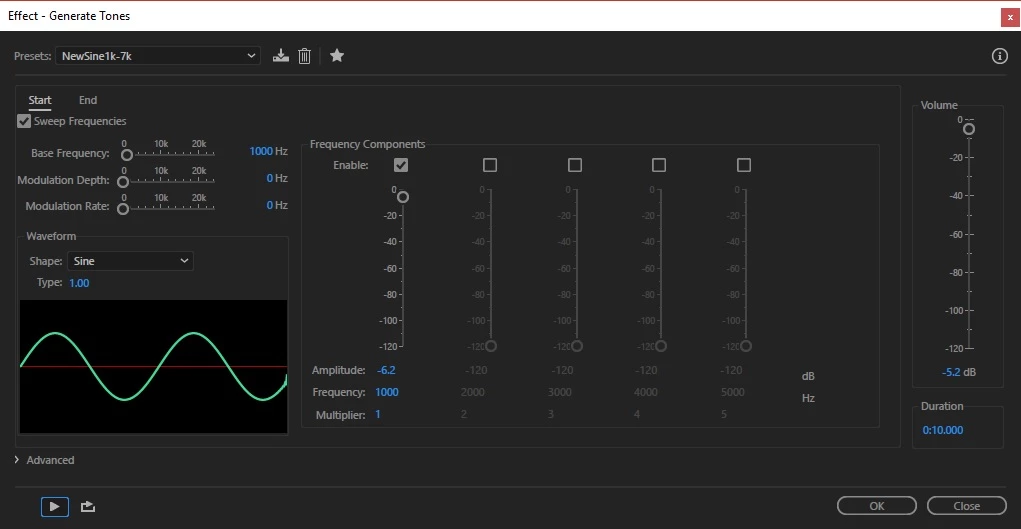
You have to click the OK button for Audition to actually create the sine wave according to the specifications that you have set and the duration of the audio required. Then Audition will revert to the Waveform edit view with your newly created sinewave showing in it. The chosen File name will show at the top left, with the * when you haven't saved it.

10 replies

SteveG_AudioMasters_
Community Expert
Community Expert
Jan 29, 2017 7:55 PM UTC

Not actually in front of Audition at present,  but IIRC, you should go to Effects>Generate>Tones to do this.

Translate
GregNHAuthor
Participant
Jan 29, 2017 8:12 PM UTC

Thank you for the reply.  I can generate the wave I want but I do not have an option to save it as a file.  It stays within AU.

Translate
SteveG_AudioMasters_
Community Expert
Community Expert
Jan 29, 2017 9:22 PM UTC

Once you've got it showing as a file on the screen, you have to select File>Save, or Save As to save it. Sorta makes sense really!

Translate