

LaSalamander
Inspiring
August 15, 2018
Answered

Searching for files from within Audition

  • August 15, 2018
  • 1 reply
  • 1330 views

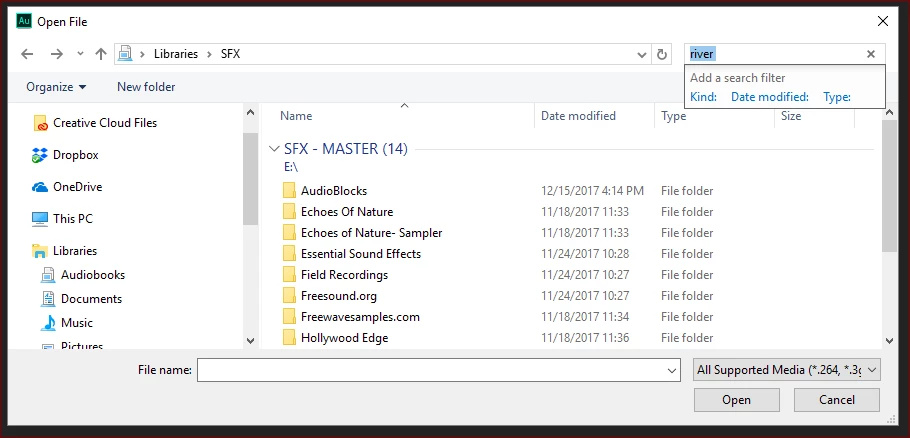
Unlike most other programs (including Audition CS6), when I go to open a file from within Audition CC, using Windows 10, I cannot perform a search. This is probably better shown than explained. Below is me trying to search for files with "river" in the name. But nothing happens. It doesn't even try to search. Is this a bug?
    This topic has been closed for replies.
    Correct answer ryclark

    I have done some tests on this and I agree that this does seem to be a bug in the latest version of Audition with Windows 10. Audition uses a lot of Windows functionality in it's file handling features I believe. However the file search feature in the Open file dialogue does actually work OK in Audition CC 2018 and Windows 7. Also Audition CC 2017 with Windows 10 file search does still seem to function as expected. SO it seems to be the combination of Win 10 and AA CC 2018 that is the problem for some reason. So probably a good idea to enter a Bug report about it.

    1 reply

    ryclark
    ryclarkCorrect answer
    Participating Frequently
    August 16, 2018

    I have done some tests on this and I agree that this does seem to be a bug in the latest version of Audition with Windows 10. Audition uses a lot of Windows functionality in it's file handling features I believe. However the file search feature in the Open file dialogue does actually work OK in Audition CC 2018 and Windows 7. Also Audition CC 2017 with Windows 10 file search does still seem to function as expected. SO it seems to be the combination of Win 10 and AA CC 2018 that is the problem for some reason. So probably a good idea to enter a Bug report about it.

    LaSalamander
    Inspiring
    August 16, 2018
    ryclark
    Participating Frequently
    August 21, 2018

    Yes I also reported it as a bug. Apparently the work around at present to make the search function work is to change the File Type from All Supported Media to the one that you want such as .wav or .mp3 etc.