
poodlepuddles
Participant
April 22, 2018
Question

Seemingly Random Unwanted Silences on Audio Files

  • April 22, 2018
  • 1 reply
  • 258 views

For some reason audition is silencing small segments of sound throughout my audio files.  I am working on a multitrack session.   It seems to be happening after I make edits.

I believe that it is happening when i merge two clips together e.g. after i delete a segment of audio and merge the remaining two clips together.  The silences are not happening at the point at which two sound clips merged, however they are happening minutes later in the audio.

I have attached a picture below in which I highlighted an unwanted silence on a voice file that was inserted mid-speech.  I highlighted the portion of sound that audition automatically silenced.
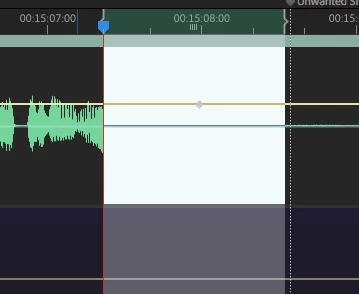
Any help would be much appreciated.

This topic has been closed for replies.

1 reply

SteveG_AudioMasters_
Community Expert
Community Expert
April 22, 2018

I'm not absolutely sure, but I suspect that this may be related to a known-about bug in the present release relating to clips not moving correctly when moved, certainly when they're under group control. It might be helpful if you can provide chapter and verse on making this happen repeatedly... as much process detail as possible.

poodlepuddles
Participant
April 23, 2018

Thanks for the reply.  I am sorry what do you mean by "chapter and verse"?

SteveG_AudioMasters_
Community Expert
Community Expert
April 23, 2018

Every single detail you can think of relating to how you arrive at this situation - all the steps in the process, in order. The reason for this is that not infrequently, these things only happen in one particular sequence of operations, and if we don't know what that is, then it's much harder to identify the exact cause.