
Selecting L or R channel using only the mouse?
Hello! I've been using Audition to clean up vinyl recordings and it is wonderful. It does a perfect job of fixing pops without making an impact on the sound.
I zoom in very far with mouse scroll button with right hand, and use the Auto Heal on a shortcut key with left hand.
Sometimes the pop I need to fix is only on one channel, so I need to select only L or only R, before I do the auto heal:
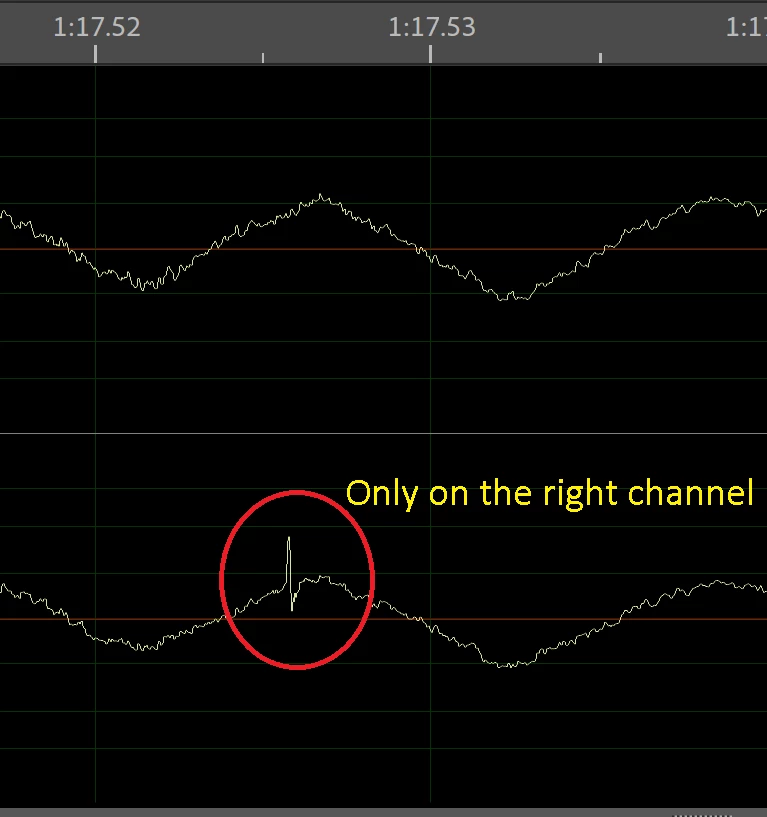
This requires me to take my right hand off the mouse, and use the up/down arrow to highlight only L or only R, once before and once after the auto-heal (to get back to stereo). It sounds minor but I fix a million of these in one file, and on my laptop the up/down arrow keys are skinny little buttons I have to stop and look at to find them.
There used to be a way in the old Cool Edit application, where using the mouse only, it would highlight only one channel, L or R, depending on how far deep into the one side you were dragging the mouse. Basically you can select L or R only mode, easily without stopping to type any buttons to select either L or R.
Does such an option exist in the current version? Maybe setting it to some less annoying shortcut buttons is the next best thing, but using the mouse only was sure great.
thanks for reading, hope it made sense!
J


 AdChoices