
Participant
April 11, 2017
Answered

Side Chain Icon

  • April 11, 2017
  • 3 replies
  • 2249 views

I hope I'm not being daft!

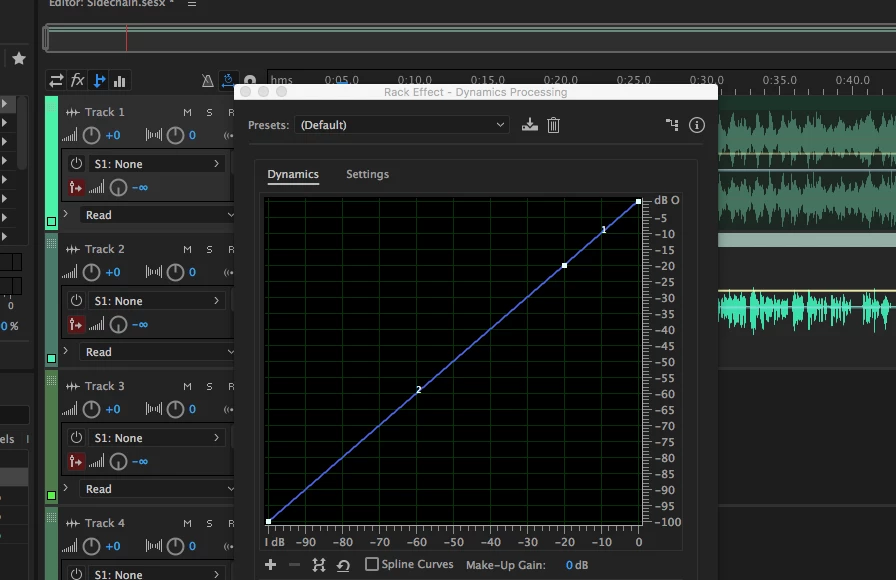
I'm trying to set up a side chain for music ducking, but the Side Chain Icon is not showing when I go in to Dynamics Processing. Suggestions please?!

I'm on Audition 10.0.2.27 running on a Mac Sierra OS.
    This topic has been closed for replies.
    Correct answer Charles VW

    Is your effect on a clip or a track?

    3 replies

    Participant
    April 13, 2017

    You have solved it for me, I was selecting the effect on the clip not the track.

    Thanks both for your help, fantastic!

    Best

    Graham

    Participant
    April 12, 2017

    Thanks for he replys, will check through again. Pretty certain that I have work through all of this though, the icon is not showing...is it always meant to be there or only when certain selections are made?

    ryclark
    Participating Frequently
    April 12, 2017

    As far as I could see when I was trying it out after your first post the icon should always be there. the only time it wouldn't appear is if you happen to open an earlier version of Audition CC. It didn't appear until CC 2015.

    ryclark
    Participating Frequently
    April 11, 2017

    It is strange that there isn't any icon showing. However assuming that Track 1 is the music that you want to duck is the Dynamics Processor effect added to the FX Rack on track 1? Then if Track 2 is your V/O you need to add Sidechain routing from the S1 send box dropdown menu.

    SteveG_AudioMasters_
    Community Expert
    Community Expert
    April 11, 2017

    The icon should show though, wherever you put it in Multitrack view. It certainly does here...