


Participant
January 26, 2020
Question

"Skipping" and "Pops" During Recording into Audition

  • January 26, 2020
  • 2 replies
  • 3156 views

This has been very frustrating and I'm hoping someone can help - I've used audition for years and in the past 6 months or so, every so often while recording, sound will appear to "skip and pop" (example attached) in recordings. It has nothing to do with playback or rendering, its immediately in the raw recorded audio though its not noticable enought in the wavelength to catch it happening in the moment because the pops are so quick and subtle - in fact you can only REALLY see it in the spectral frequency display. (shown here) It will come and go on its own and I can't recreate it on demand. 
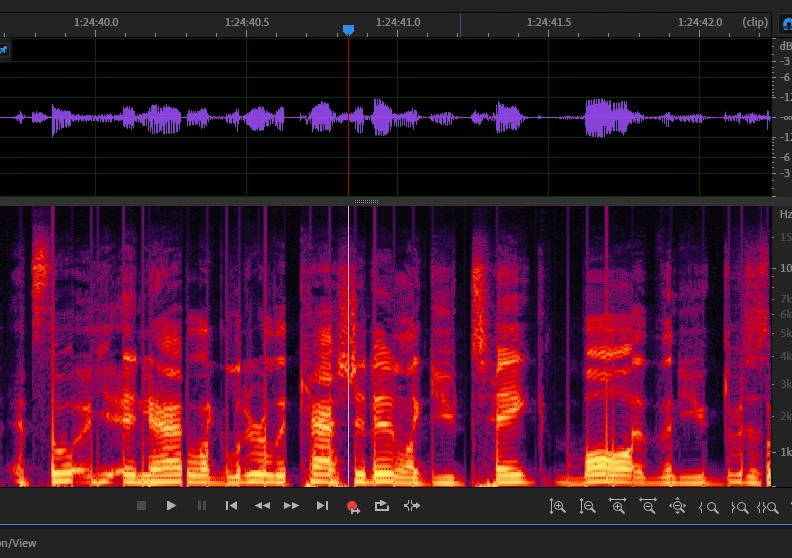
 

At first I thought it was just my old laptop - so I literally replaced both my laptop and my interface and the problem persists!


Running most recent Audition 2020, 64bit Windows 10 with 36G ram, Intel i7, and a Presonus Studio 24c with USB c cable.


Does anyone have any idea why this is happening? Could it be sample rate? Bit depth? Any assistance would be greatly appreciated!


This topic has been closed for replies.

2 replies

Participant
June 24, 2020

I'm experiencing the same thing.  I thought it was me being on wireless, so I switched to an ethernet cable, and it persists.  Using a Focusrite 2i2 interface and an IBM ThinkPad.  I'm thinking about trying to get a "hard copy" of the program, whenever the last one of those existed, or *sigh* switching to another software program altogether.  We'll see.    

SuiteSpot
Inspiring
June 24, 2020

Try increasing the 'I/O Buffer Size'
Edit > Preferences > Audio Hardware 

Also make sure that the sample rate of your audio interface is the same as your session file and lastly make sure you are using an ASIO driver for your interface if one is available

MaxDirect Audio, LLC
Known Participant
January 26, 2020

Unfortunately, it's not just you or your system.  I experienced the same issue when I updated to 13.01 on my iMac.  I reverted to 13.0 and the skipping went away, I would suggest the same.  I put in a bug report to the team.

Participant
January 26, 2020

Really?! Thanks I'll give a go! Will I be able to open pre-existing multitrack projects created in the more recent update?


Can anyone else corroborate this is indeed the only issue?

MaxDirect Audio, LLC
Known Participant
January 26, 2020

Yes, you can open older .sesx files in 13.0.  There were other smaller issues I noticed as well, and they were reported.  They had to do with switching between the "move tool" "cut tool" and "slip tool" icons not consistently updating with the screen cursor in multitrack or waveform.  I didn't dive into it any deeper as I had a project to complete.