

D.M.P studio
Known Participant
June 24, 2018
Answered

Snapping

  • June 24, 2018
  • 1 reply
  • 1713 views

Searched forum..cldn find answer...how do i snap the marker back to the original spot playbak started instead of it stopping where i stopped playback..i know the snapping options is in the edit section..but what do i hit? Usually i just hit enabled when i need to line up clips correctly...but that doesnt do the snap to original startig point.
    This topic has been closed for replies.
    Correct answer SteveG_AudioMasters_

    We don't call that 'snapping' - that has another meaning to do with the granularity of the CTI positioning (you can alter this by right-clicking on the timeline and selecting the options you want to snap to.

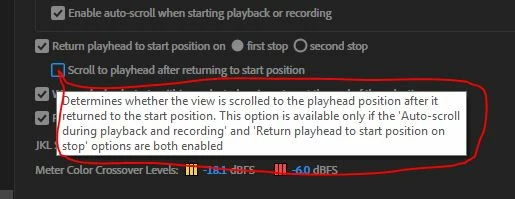
    For what you want to achieve though, the settings you will almost certainly need are these:

    The one I've put a red ring around is a setting you may want - it rather depends upon how long your playback selection is. The important one is the one above, that says 'Return playhead to start position on first stop'. Selecting 'second stop' is a bit of a pain because the second stop return only works if you use the mouse on the stop button; it doesn't toggle with the space bar.

    1 reply

    SteveG_AudioMasters_
    Community Expert
    SteveG_AudioMasters_Community ExpertCorrect answer
    Community Expert
    June 24, 2018

    We don't call that 'snapping' - that has another meaning to do with the granularity of the CTI positioning (you can alter this by right-clicking on the timeline and selecting the options you want to snap to.

    For what you want to achieve though, the settings you will almost certainly need are these:

    The one I've put a red ring around is a setting you may want - it rather depends upon how long your playback selection is. The important one is the one above, that says 'Return playhead to start position on first stop'. Selecting 'second stop' is a bit of a pain because the second stop return only works if you use the mouse on the stop button; it doesn't toggle with the space bar.