Known Participant
February 21, 2017
Answered

Specific mono conversion (CCITT u-Law 8.000 kHz, 8 Bit, Mono)

  • February 21, 2017
  • 2 replies
  • 19773 views

I recorded some "On-Hold" messages for our phone system which I produced the finals in Audition CC.  Unfortunately it ends up that the phone system (Avaya) requires a specific recording type and I'm not figuring out an export scheme to match what it requires.

CCITT u-Law 8.000 kHz, 8 Bit, Mono

Will someone knowledgeable on audio formats and the ability of Audition to export to this format let me know the settings or if it's even possible?


Thanks,
Dave

Correct answer SteveG_AudioMasters_

In that case, probably these settings:

2 replies

SuhrabS17
Participant
November 27, 2024

use this link to convert your audio to CCITT u-Law 8.000 kHz, 8 Bit, Mono

https://g711.org/

jasonh21189773
Participant
June 25, 2025

Ok, while this is again resurrecting a long dead thread, I was doing some digging and I believe Spencer got it right above, and I have an explanation of why. If you set the Sample Type in Audition to 8k, 8-bit Audition will (in its order of encoding) first do the sample rate conversion to 8K, 8-bit Linear PCM and THEN convert to uLaw 8-bit PCM (which is logarithmic, not linear). If you leave the bit rate in the Sample Type section alone (whatever you started with) then the initial conversion just changes the sample rate but not the bit rate, then will convert the higher bitrate audio to the correct uLaw 8-bit PCM format and because the full linear data was there to at the beginning of that part of the process (rather than being discarded with an 8-bit sample rate conversion) the logarithmic conversion has doesn't introduce all of the noise. Quality will always be low because it is 8k (and we all expect that) but the noise is avoided.


Does that sound correct according to the physics? 

SteveG_AudioMasters_
Community Expert
Community Expert
February 21, 2017

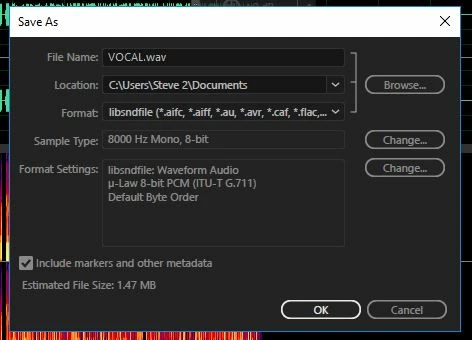
You haven't said what the extension is, but the principle's the same whatever you use. Most probably the correct format container will be in libsndfile, so what you are looking for is something like this:

So you use the pulldown  at the end of the line to select the format, and then click on 'change' to select the type of recording you want (8k 8-bit mono), and in the 'format settings' box use Change to select something appropriate (which is slightly wrong in that picture!), and then put the extension you want on the end of the file name.

If you haven't done this before, then there are a few things you need to be aware of before saving in such a restricted format. I covered most of it in another thread not so long ago, and you can see that here:

Audio Format File Conversion

Known Participant
February 21, 2017

The extension is WAV.  Sorry about that.

I will look at what you've shown.

Thanks for the help.

SteveG_AudioMasters_
Community Expert
SteveG_AudioMasters_Community ExpertCorrect answer
Community Expert
February 21, 2017

In that case, probably these settings: