
sgscott
Known Participant
March 29, 2018
Question

Stereo Channel Disabled from Premiere Pro Export

  • March 29, 2018
  • 4 replies
  • 2643 views

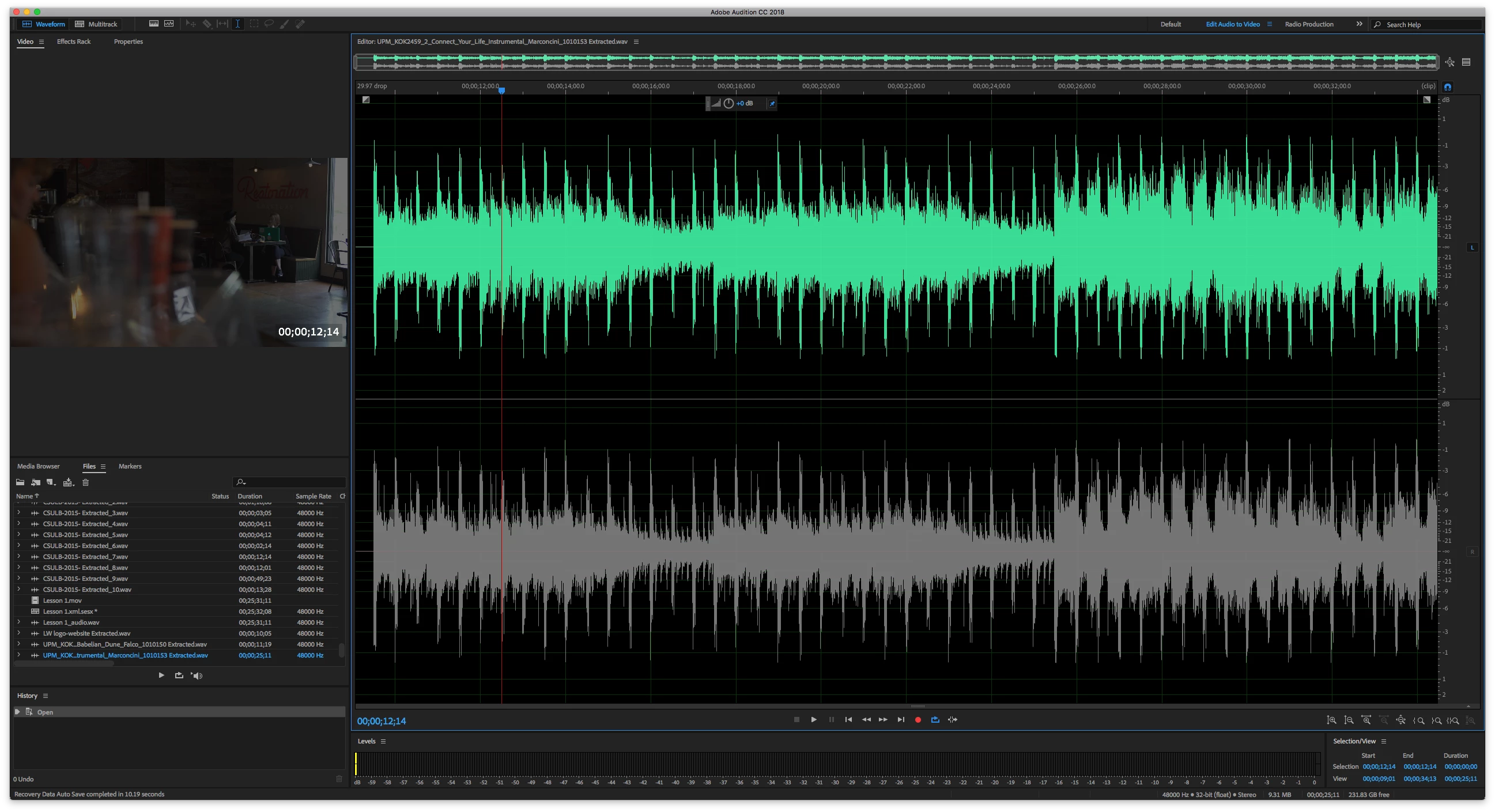
I exported a PP Multicam timeline to Audition for editing and mixing there. Allot of tracks came across, some stereo, some mono. Some of the clips in the mono tracks are stereo with one or the other channel disabled. The disabled channel cannot be Enabled. Why? And how do I defeat this?

I have tried moving one of the clips to a stereo track; but nothing I have tried or have looked at seems to be of any avail. In the Edit view, I can see the other track's waveform and data. I just can't Enable it?

Premiere Pro CC (12.0...)

Audition CC (11.0...)
    This topic has been closed for replies.

    4 replies

    Adobe Employee
    August 19, 2019

    A bug was created for this. 

    Participating Frequently
    August 13, 2019

    I too am having a similar problem. A client disabled some audio tracks in a premiere project, then exported the project to Audition so that I could edit the sound for him. Tracks that are disabled in Premiere cannot be re-enabled in Audition (at least in my situation, when handing off a project to someone on a different computer). I would love to have a solution to this as well.

    Adobe Employee
    August 13, 2019

    "A client disabled some audio tracks in a premiere project".  How were the tracks disabled?

    Participating Frequently
    August 14, 2019

    In Premiere, highlight the audio clip(s) you don't want to hear, right-click and select "disable." The problem is, if you then send that project to Audition, those tracks have no audio in them, even when unmuted. If there's another way to quickly "mute/unmute" individual clips in premiere (so that it comes across in Audition), I'd love to see it.

    Participant
    August 11, 2019

    I am also experiencing this same problem,  version 12.1.0.182. I pulled an adobe premiere project into audition and was working on the final audio for the film when I cam across several files that when converted from Mono  to Stereo gave me the same problem. has there been any additional information on this issue to date?

    ryclark
    Participating Frequently
    August 13, 2019

    paulnf36  wrote

    I am also experiencing this same problem,  version 12.1.0.182. 

    Have you tried with the current version of Audition CC 2019 build 12.1.2.3 which is newer than the version that you are still running.

    SteveG_AudioMasters_
    Community Expert
    Community Expert
    March 29, 2018

    Can you see the little 'R' in a square at the RH edge of the lower waveform? Currently it's grey, unlike the blue one above. Try clicking on it...

    sgscott
    sgscottAuthor
    Known Participant
    March 29, 2018

    Yes Sir; first thing I tried.

    STUART SCOTT

    POSTPRODUCTION EDITOR

    [personal information removed per policy - https://forums.adobe.com/docs/DOC-3731]

    [This is a public forum, not Adobe support, please do not post personal information]

    [If you are posting using email, please turn your 'sig file' function OFF for posting]

    SteveG_AudioMasters_
    Community Expert
    Community Expert
    March 29, 2018

    What does it say in Edit>Enable Channels? Can you enable it there?