
cheyrn
Inspiring
Nov 19, 2017 6:32 AM UTC
Answered

Still no way to enter keyframe value?

I think the answer is no. But, is there a way to type a number and have that be used as the value of a keyframe? I'm giving up after a few hours trying to get key frames to have values that are all within a 3db range and it goes -2, +7.1, +1.1, +9, 0, +5 etc. etc. etc.

    This topic is closed to new replies. Start a new post to keep the conversation going.
    SteveG_AudioMasters_
    SteveG_AudioMasters_Correct answer
    Community Expert
    Jun 26, 2019 9:03 AM UTC

    Strange - I thought this was all available in 2017, but whatever...

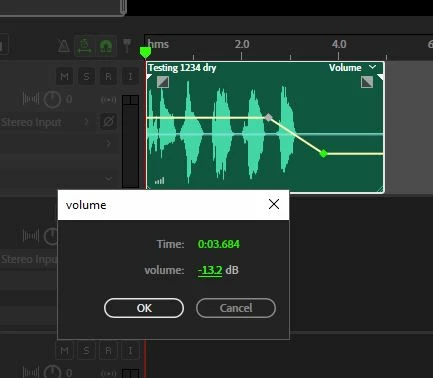
    If you right-click with the mouse on a keyframe, you get an option to edit it. If you take that option you get this:

    No zooming required at all.

    5 replies

    ryclark
    Participating Frequently
    Nov 19, 2017 12:12 PM UTC

    You are correct there isn't any way at present to type in Keyframe values. It has been requested many times.

    However I am not sure what the numbers you are quoting refer to. I can make mouse adjustments of keyframe values on my system that are in 0.2dB steps. Well within the 3dB range that you are quoting. Are the values that you are getting at different keyframe points on one Track or across several different tracks? Not quite sure from your post what you are trying to do.

    Translate
    cheyrn
    cheyrnAuthor
    Inspiring
    Nov 19, 2017 7:47 PM UTC

    I am adjusting volume on one track, or 2 for left and right. I haven't decided yet. Either way, I haven't managed to move the value in 0.2db steps. Just now, trying to be as precise as possible attempting to enter +0.8, it goes from 0 to +1.9 down to -1.6. And that is being extremely careful. Something I would not be able to maintain for very long.

    I have mouse acceleration turned off. But, I don't have a high resolution mouse or trackball.

    Translate