
March 16, 2017
Question

Suffering latency in adobe audition cc

  • March 16, 2017
  • 1 reply
  • 5114 views

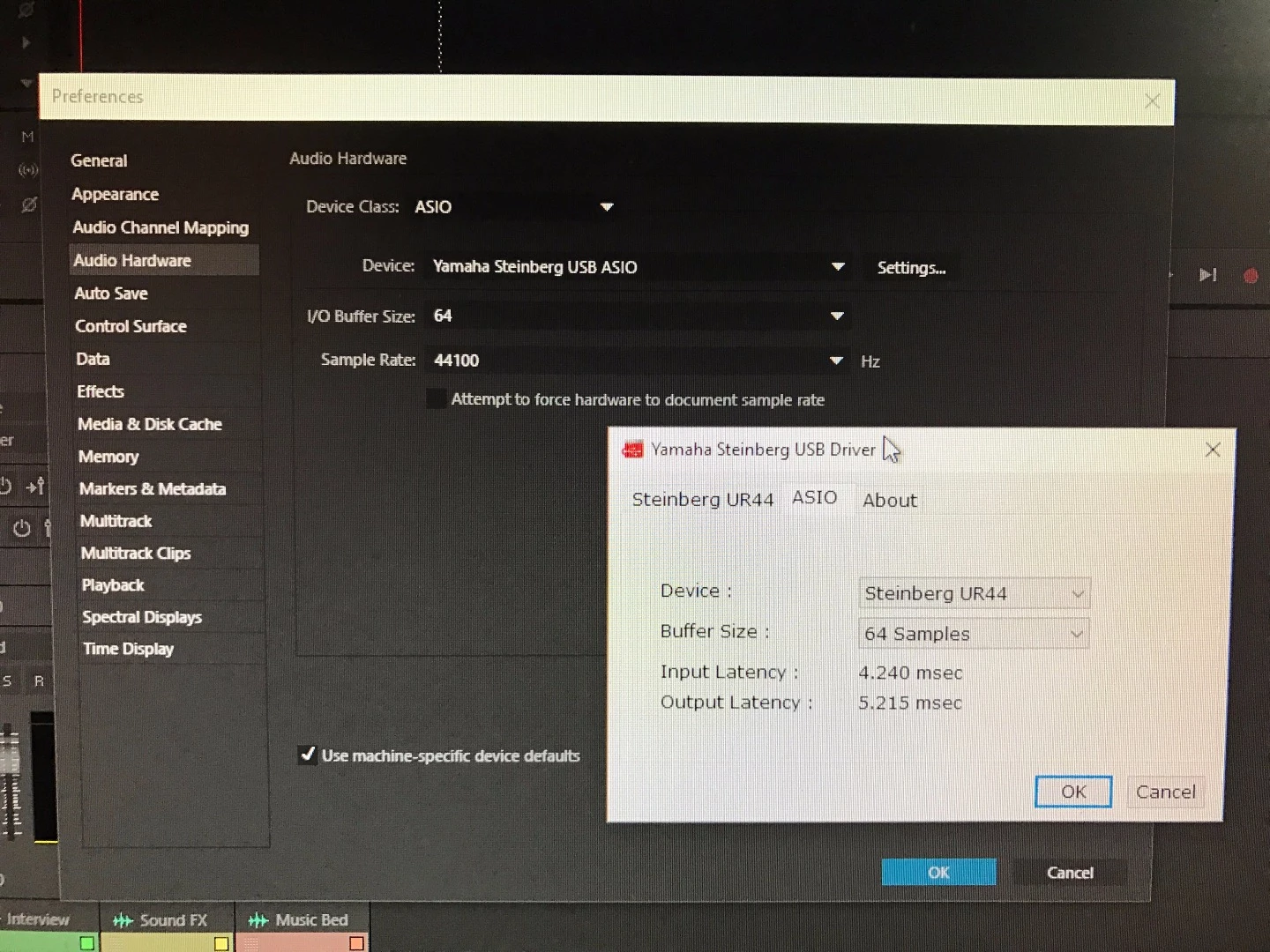
Here is a screenshot of my hardware settings. 

I have an i5 4690k @ 4.3 ghz, 16 GB ram, gtx 1080.

I have a yamaha steinberg UR44 as you can see.

Im not sure what happened but all the sudden i am suffering from unbelievable delay. Like half a second delay.

Not sure what other information you would need but i'd be happy to provide any other details you need.

Thanks guys.
This topic has been closed for replies.

1 reply

Legend
March 16, 2017

Unless I'm completely misreading the figures in the screenshot of the Steinberg driver, you have an input latency of 4.240 milliseconds (that's 4 decimal two four zero) and output latency of 5.215 milliseconds.  Added together they total just under 10 milliseconds, or 10 thousandths of a second, nothing like you stated as being "half a second".  (If you are reading those figures as 4,240 milliseconds + 5,215 milliseconds, that would equate to a total of nearly 10 seconds!)

So, if you do have a latency problem on your machine I would strongly suggest it is not caused by your interface driver.  Something else must be the cause.

Or, have you posted that screenshot in order to demonstrate that your interface is not the problem?

March 16, 2017

That's exactly what im confused about. It is literally half a second when i monitor the recording through my interface headphone jack. Is there anything that i can change as far as monitoring goes? Is there a way to change the output to my computer speakers and then use headphones? Any advice?

EDIT: Restarted my computer and it is better but not fixed by any means. The inputs and outputs show that Im on the correct input. I dont know what else to do here.

Legend
March 16, 2017

Can you post a screenshot of your Audio Channel Mapping page?