
CaseyB67399
Participant
November 8, 2021
Question

Text Annotations in Audition

  • November 8, 2021
  • 2 replies
  • 728 views

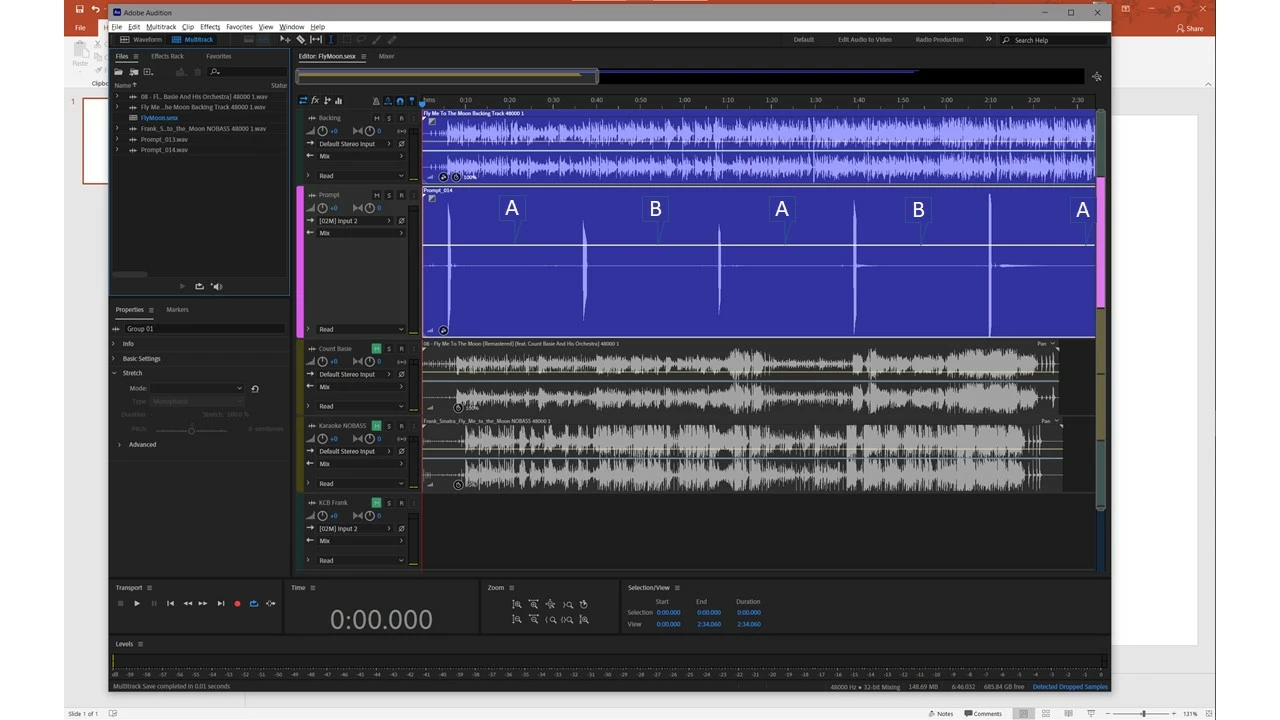
I can not find a way to put text annotations in a track or clip in Audition. I would find it handy to have a way to put a large text anotation, fixed to a point in the recording, in either a clip or a track. Ideally, the notation would be fixed such that it would move with the indicated point if the clip is stretched, etc. See attached .jpg image for a mockup of what I hve in mind.
This topic has been closed for replies.

2 replies

Rag and Bone
Community Expert
Community Expert
November 8, 2021

You can also add markers,  give them names, and add descriptions to them.

CaseyB67399
Participant
November 8, 2021

Thanks for quick response. Neither of those soultions is what I had in mind. Note in my screen image the text is BIG. The Notes add-in lets you make a list of notes that appear in a separate window as far as I can tell, not on the track itself. I tried Markers as well, but the text notation (or, name of the markler) for them is at the top and very small font that is not apparenelty changeable that I can tell. The feature I am thinking about would work well as an additional feature to markers, especially in a range marker. If developers added a feature that would be something like an additional text entry that would display in the middle of the range over the track (not at the top), and of course move with it if i got moved or otherwise modified. The user could modify the font size, boldness etc for the text, maybe even transparency so it does not obscure the waveform.

Rag and Bone
Community Expert
Community Expert
November 8, 2021


Here's the "Suggestion Box"  for Audition. Why not copy and paste your post there: that page gets passed to the developers—this page is for users like you and me 🙂

Rag and Bone
Community Expert
Community Expert
November 8, 2021

Try this.