


jeremy.trail@icloud.com
Participant
June 20, 2026
Question

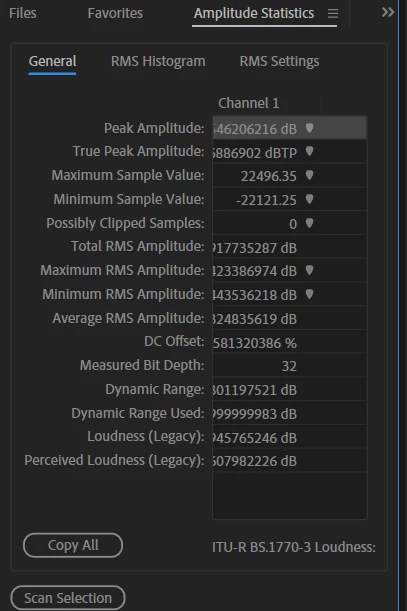
The numeric decimal places in amplitude statistics suddenly changed on me. Does anyone know how to get these back to default or normal?

  • June 20, 2026
  • 2 replies
  • 17 views
Does anyone know how to change the numeric decimal places in amplitude statistics back to normal? Mine changed out of nowhere to really long format and I cant get them back to the way they were or default. Thanks./


    2 replies

    Rag and Bone
    Community Expert
    Community Expert
    June 20, 2026

    I’m seeing this as well, 26.3 on Mac OS 25.5. Surely a bug. And since the digits are right aligned, the more significant digits are truncated unless you resize the column! 

    Participating Frequently
    June 20, 2026

    I don’t have a solution but I am seeing the same behaviour with the latest version.

    jeremy.trail@icloud.com
    Participant
    June 20, 2026

    Ah, so it's not something that I have done then? Well, that makes me feel better lol.

    Participating Frequently
    June 20, 2026

    It has to be a bug somewhere. No one needs 20 significant digits of amplitude data! 
    I am using a standard Realtek driver on a Windows PC. But I see you’re using an icloud email - so you’re using Apple hardware? That suggests the problem is with Audition since our systems would have very little in common otherwise.