
Jogen
Inspiring
July 28, 2017
Answered

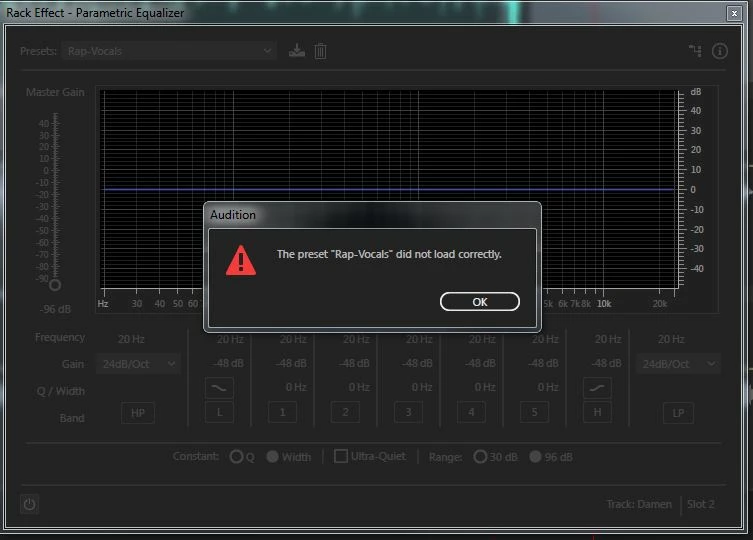
The preset "..." did not load correctly (error message)

  • July 28, 2017
  • 1 reply
  • 7696 views

Hello over there,

most time working in premiere, today I have an audio project with a dozen vocals and a novox music bed.

In EQ effects I can´t chose a preset, see pic below - does anybody knows what to do?

Reinstall Audition?

Thanks in advance,

Jo
    This topic has been closed for replies.
    Correct answer SteveG_AudioMasters_

    All you need to do is trash the EffectPreset file in Preferences, with Audition closed. When you restart it, a new 'vanilla' file with all the original presets will be re-instated automatically. You haven't said whether this is Windows or Mac - the path to the preference folder in Windows is:

    C:\Users\{username}\AppData\Roaming\Adobe\Audition\10.0

    1 reply

    SteveG_AudioMasters_
    Community Expert
    SteveG_AudioMasters_Community ExpertCorrect answer
    Community Expert
    July 28, 2017

    All you need to do is trash the EffectPreset file in Preferences, with Audition closed. When you restart it, a new 'vanilla' file with all the original presets will be re-instated automatically. You haven't said whether this is Windows or Mac - the path to the preference folder in Windows is:

    C:\Users\{username}\AppData\Roaming\Adobe\Audition\10.0

    Jogen
    JogenAuthor
    Inspiring
    July 28, 2017

    Hello Steve,

    thank your for the fast reply, now all presets work fine!

    And yes, I work on Win7/64...

    best,

    Jo

    ryclark
    Participating Frequently
    July 28, 2017

    Although it is sometimes better to rename the settings folder by adding something like .bak onto the end of the name. otherwise you will also trash any custom settings that you may have saved. At least if you rename the folder you can go in and copy back your custom presets (provided they are not corrupted) into Audition's newly created settings folder.