
Participant
August 26, 2017
Answered

This should be easy...but it's not!

  • August 26, 2017
  • 1 reply
  • 1673 views

I have happily used Audition for years as a voiceover artist, with my Neumann mic into the Mic1 Input of an Apollo Twin Interface, into an iMac running Audition. I record in Waveform in mono, as it's just a voice.

Problem is, I've just added a Sennheiser mic to the set-up, plugged it into Mic2 input of the Apollo Twin, thinking I will be able to easily switch between the two, depending on the job I'm recording at the time.

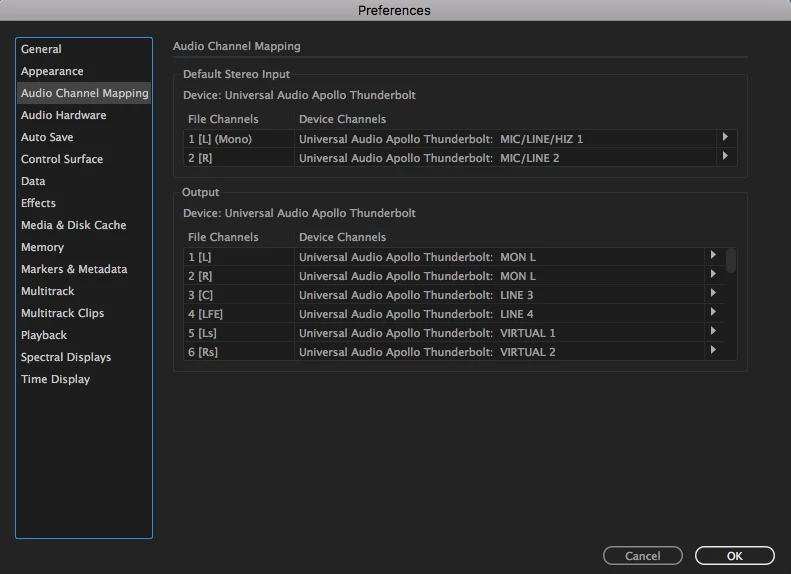
However, if I now record in mono,  Audition will only receive the input from Mic1, because Mic1 is on the left channel and Mic2 is on the right. I think I need to change what appears to be the 'Default Stereo Input' to mono, but can't for the life of me work out how. Here's the screen shot of Audio Channel Mapping if it helps.
Any help would be really appreciated.

Tom

    This topic has been closed for replies.
    Correct answer ryclark

    You can't make the inputs in the hardware set up page mono. However all you have to do is to swap over the Device channels in the Default Stereo Input boxes. Clicking on the arrow icons to the right of the boxes will open a drop down menu to allow you to select which input goes to the default mono (L) channel in Audition. This is all assuming that you are recording directly into Audition's Waveform view. In the Multitrack view each track has a choice of inputs selectable in the Track header. 

    1 reply

    ryclark
    ryclarkCorrect answer
    Participating Frequently
    August 26, 2017

    You can't make the inputs in the hardware set up page mono. However all you have to do is to swap over the Device channels in the Default Stereo Input boxes. Clicking on the arrow icons to the right of the boxes will open a drop down menu to allow you to select which input goes to the default mono (L) channel in Audition. This is all assuming that you are recording directly into Audition's Waveform view. In the Multitrack view each track has a choice of inputs selectable in the Track header. 

    dtfreeAuthor
    Participant
    August 27, 2017

    Thank you very much! I thought it would be easy!