


OsakaWebbie
Inspiring
July 30, 2020
Answered

Toggle playback of two tracks?

  • July 30, 2020
  • 2 replies
  • 1166 views

I'm digitizing a bunch of old cassettes, and often I end up with two recordings of the same thing and I want to compare side-by-side to see which is better (sometimes they are very similar). In Multitrack, I can click Solo (or Mute) to hear just one, but to switch to the other I have to click Solo (or Mute) on both tracks, which I obviously can't do simultaneously. Is there a way to swap between two tracks with a single action, so that I can go back and forth without interruption while the timeline plays?

This topic has been closed for replies.
Correct answer SteveG_AudioMasters_

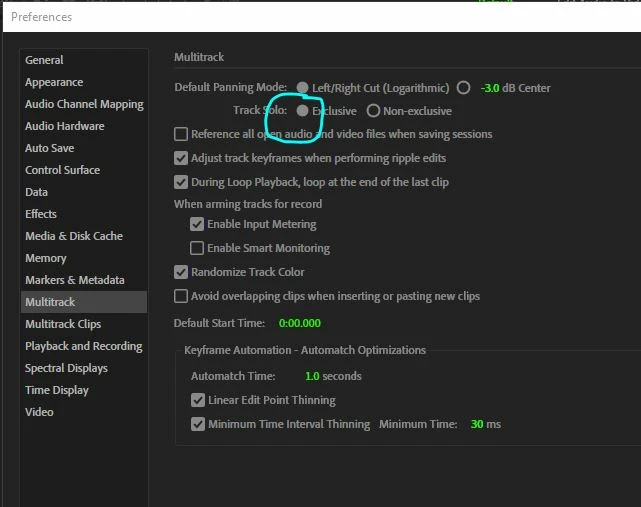
Simple - in Preferences,  just change the track solo mode to exclusive:

Now when you hit Solo for the track, all the rest will mute automatically. If you want to hear another track, just hit solo on that one, and the same thing will happen.

2 replies

Participant
October 25, 2020

Drat! This must be only on later versions than mine. I only have Audition 3 and there's no sign of that option in the multitrack preferences.

SteveG_AudioMasters_
Community Expert
Community Expert
October 25, 2020

Yes it is only on later versions. Took me quite a while to persuade the developers that 'Solo' actually means what it says. A non-exclusive Solo is, essentially, a non-sequitur but they had to leave the option apparently, because some strange people actually liked it the old way (not me though).

LittleGreenDog
Participating Frequently
December 14, 2024

Soloing tracks to compare different takes is soooo much easier now. 


This had been making me crazy for a while, so thank you for posting the solution!


D.R. Greenlaw - Artist/Partner, Little Green Dog | (Formerly Lead Digital Animator, DreamWorks Animation)
SteveG_AudioMasters_
Community Expert
SteveG_AudioMasters_Community ExpertCorrect answer
Community Expert
July 30, 2020

Simple - in Preferences,  just change the track solo mode to exclusive:

Now when you hit Solo for the track, all the rest will mute automatically. If you want to hear another track, just hit solo on that one, and the same thing will happen.