


Participating Frequently
September 13, 2021
Question

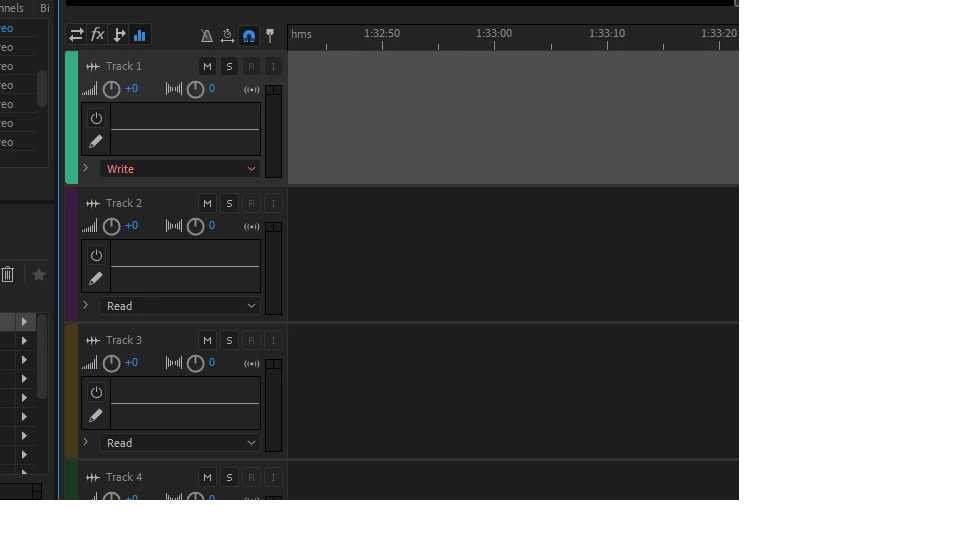
Tracks in Audition CC 2019 don't show the device input options!

  • September 13, 2021
  • 2 replies
  • 1013 views

Help! I'm using a loaner computer with CC 2019 and the device inputs are not there!! The tracks record both left and right into the same track! I'm used to 2015 where I could put my mic in track 1 and the other person in track 2.  But this won't let me tell the tracks which mics to look at, and like I said, both sides are coming out stereo on one track! I want mono, but can't select that.  It just gives options for None, Read, Write, Latch, etc.
 

2 replies

SteveG_AudioMasters_
Community Expert
Community Expert
September 13, 2021

I'm not surprised that you can't see inputs and outputs when you are looking at the automation pulldown in the EQ tab... 😉


You want the the tab on the left with the two arrows (in and out).

Participating Frequently
September 13, 2021

Please forgive my ignorance. I'm used to them popping up automatically and I don't see the tab you are describing. Can you send a  pic?

Participating Frequently
September 13, 2021

I can't seem to get the print screen function to show the whole left side.

Participating Frequently
September 13, 2021

And now the pan feature on each track has disappeared!