

Tracks not sending to Mix (Master) track - Please Help
Okay so I'm using version 22.6 of Audition. My OS is Windows 11 Pro and I have all the latest updates. My audio interface is a Scarlett 2i2, which I have the latest drivers installed.
I tried resetting to factory defaults and my issue is still occurring.
Here's the full details:
In a multitrack session, for my individual audio tracks I have the input set as one of the two inputs on my Scarlett and the output is set as mix.
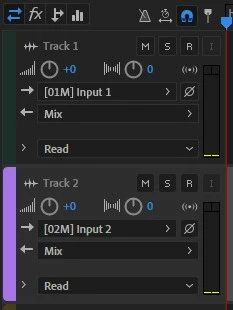
If I arm the track I will get audio signal from my Scarlett, on that particular track. However, if I navigate to my mix (master) track I and look at the levels, I am getting nothing, even though I have the track output to send to mix.
Is there extra steps or settings that I am missing? Is there something broken here? This is a core function of multitrack session and should be simple enough to function.
I really appreciate your help.


 AdChoices