
Participant
July 14, 2017
Answered

Two questions about multitrack sessions

  • July 14, 2017
  • 1 reply
  • 1358 views

I was very familiar with Cool Edit Pro and Adobe Audition 3 back in the day.  I'm finally getting back into music again but a couple things with Audition CC have thrown me off and I can't find the answer in the program preferences.

1.  When deleting the beginning portion of a clip in the waveform editor, it moves the entire clip in the multitrack regardless of it being locked in time.  How can I delete the beginning of a clip without the entire clip moving?

2.  When exporting a session as a Multitrack Mixdown, it also adds any blank/silent space at the end of the session.  For example, I record a 2 minute song, mix it down and its 2 minutes 30 seconds because it adds 30 seconds of silence at the end.  I want the mixdown to end after the last clip.  How do I do that?

Thanks!
    This topic has been closed for replies.
    Correct answer SteveG_AudioMasters_

    in8486  wrote

    1.  When deleting the beginning portion of a clip in the waveform editor, it moves the entire clip in the multitrack regardless of it being locked in time.  How can I delete the beginning of a clip without the entire clip moving?

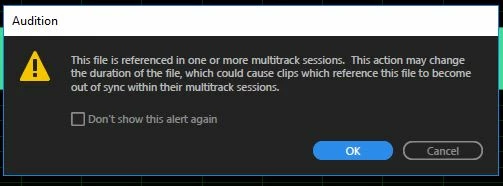
    It's the position of the clip that's locked in time, not the contents.And it's not as though you don't get a warning about it either (unless you've set them not to show):

    The norm is not to cut anything from the original file, and just make the selection you want with the clip handles.

    2.  When exporting a session as a Multitrack Mixdown, it also adds any blank/silent space at the end of the session.  For example, I record a 2 minute song, mix it down and its 2 minutes 30 seconds because it adds 30 seconds of silence at the end.  I want the mixdown to end after the last clip.  How do I do that?

    Multitrack>Mixdown to a new file>Time Selection. Use this after you've highlighted up to the end of where you want to stop - you'll then get exactly that in your mixdown.

    1 reply

    SteveG_AudioMasters_
    Community Expert
    SteveG_AudioMasters_Community ExpertCorrect answer
    Community Expert
    July 15, 2017

    in8486  wrote

    1.  When deleting the beginning portion of a clip in the waveform editor, it moves the entire clip in the multitrack regardless of it being locked in time.  How can I delete the beginning of a clip without the entire clip moving?

    It's the position of the clip that's locked in time, not the contents.And it's not as though you don't get a warning about it either (unless you've set them not to show):

    The norm is not to cut anything from the original file, and just make the selection you want with the clip handles.

    2.  When exporting a session as a Multitrack Mixdown, it also adds any blank/silent space at the end of the session.  For example, I record a 2 minute song, mix it down and its 2 minutes 30 seconds because it adds 30 seconds of silence at the end.  I want the mixdown to end after the last clip.  How do I do that?

    Multitrack>Mixdown to a new file>Time Selection. Use this after you've highlighted up to the end of where you want to stop - you'll then get exactly that in your mixdown.

    in8486Author
    Participant
    July 15, 2017

    Thanks for your help.

    Regarding #1, I've been adjusting with the handles so far but would still prefer if it could just be deleted like with Cool Edit Pro or Audition 3.  I assume there's no way to lock contents in time?  Something I'll have to get used to, either use the handles or delete and move back in place.  I try to cut and silence as much as possible to the original files to reduce file sizes.

    Thanks again.

    SteveG_AudioMasters_
    Community Expert
    Community Expert
    July 15, 2017

    in8486  wrote

    I assume there's no way to lock contents in time? 

    Correct, I'm afraid. The only thing you can lock in time is the clip 'frame' itself, not the contents of it. The change is quite logical, and came about really as a consequence of disk space became far less of an issue than it used to be. This happened quite a while ago now (the CS5.5 total rewrite after AA3) and we've pretty much got used to it.