
Participant
February 7, 2018
Answered

URGENT, I NEED HELP

  • February 7, 2018
  • 1 reply
  • 2113 views

Ok, hello everyone. I have an issue here, I have a Scarlett 6i6 interface and I´ve just connected 2 microphones at the front channels and 1 at the back to record with the 3 of them at the same time, but Audition only recognizes the 2 channels from the front. What can I do to enable the channels from the back part of the interface? I´m really worried because I have a lot of work to do now.

I hope you can help me as soon as possible.

Thankyou,

Gabriel
This topic has been closed for replies.
Correct answer ryclark

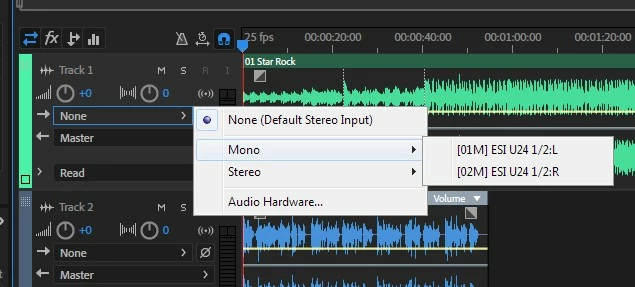
You need to have set up the 6i6 in Audition's Audio Hardware page to use the ASIO driver from Focusrite. Then start a new Multitrack session and go to the Input selection for each track to select the individual mic channels from the 6i6 for recording into the Audition session. You should see a drop down menu allowing you to choose either mono or stereo sources and a list of all the available inputs from the 6i6. This is an image showing the inputs from my ESI U24.

1 reply

ryclark
ryclarkCorrect answer
Participating Frequently
February 7, 2018

You need to have set up the 6i6 in Audition's Audio Hardware page to use the ASIO driver from Focusrite. Then start a new Multitrack session and go to the Input selection for each track to select the individual mic channels from the 6i6 for recording into the Audition session. You should see a drop down menu allowing you to choose either mono or stereo sources and a list of all the available inputs from the 6i6. This is an image showing the inputs from my ESI U24.

Bob Howes
Inspiring
February 7, 2018

To expand slightly on ryclark's post, that menu you need is found at Edit/Preferences/Audio Hardware.  As ryclark says, it's important that you install and use the Focusrite ASIO driver--and then select that on the hardware page.

Finally, if you're going to be using this configuration a lot, it's worth saving your 3 mic setup as a template.  You do this on the File/Export/Session as Template once you have your tracks all set up but before you record anything.  This'll save you having to go through the track setup every time you start a new session.

Inspiring
February 7, 2018

Bob... ryclark...

Clarification, please. For some time, I've been successfully using a Scarlett 2i2 with my Mac and its native CoreAudio driver. Should I also be using Focusrite's ASIO driver instead?

Thanks.