
Participant
July 10, 2018
解決済み

Using Audition to record multitrack from Yamaha TF Series Mixer

  • July 10, 2018
  • 返信数 2.
  • 6906 ビュー

Yamaha includes a license for Nuendo Live with their TF series mixers (we have a TF5) that I've used to record all 32 channels live pre-digital gain to use for initial sound checks and trouble shooting without the band being present.  I've gotten it to record but not play back and I really would rather use Audition anyway but I can't seem to get all of the 32 tracks for live recording into Audition.  Can this be done, is there a resource available to show me out to do this?
このトピックへの返信は締め切られました。
解決に役立った回答 SteveG_AudioMasters_

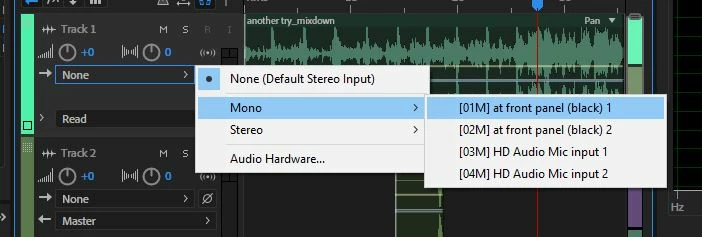
It should work. The TF5 comes with ASIO drivers, and if you select 'ASIO' as the device class in Preferences>Audio Hardware, and the TF5 as the device, all of the channels should be listed as available in the track inputs:

Select a different one for each track, arm the tracks for record, hit 'record' and they'll all roll. Then all you have to do is pray that your system can cope!

返信数 2

Participant
May 18, 2020

How did you get it to record off of the TF5?

SteveG_AudioMasters_
Community Expert
Community Expert
May 19, 2020

Everything you need to know is already in the thread.

SteveG_AudioMasters_
Community Expert
Community Expert
July 10, 2018

It should work. The TF5 comes with ASIO drivers, and if you select 'ASIO' as the device class in Preferences>Audio Hardware, and the TF5 as the device, all of the channels should be listed as available in the track inputs:

Select a different one for each track, arm the tracks for record, hit 'record' and they'll all roll. Then all you have to do is pray that your system can cope!

Participant
June 17, 2020

Hi Steve, I was wondering if you could take me through step by step. I have a TF5, never used it to record direct to Audition. I've tried following your instructions; plugged the USB To Host into my laptop, opened up MultiTrack on Audition, assigned the track to a channel on the desk but when I arm the recording, I'm not getting a signal. There doesn't seem to be much help out there for TF5 to Audition. Do I need to download extra drivers/software? Thanks.