
D.M.P studio
Known Participant
Sep 19, 2019 6:05 PM UTC
Question

VST SCROLLING ERRORS?

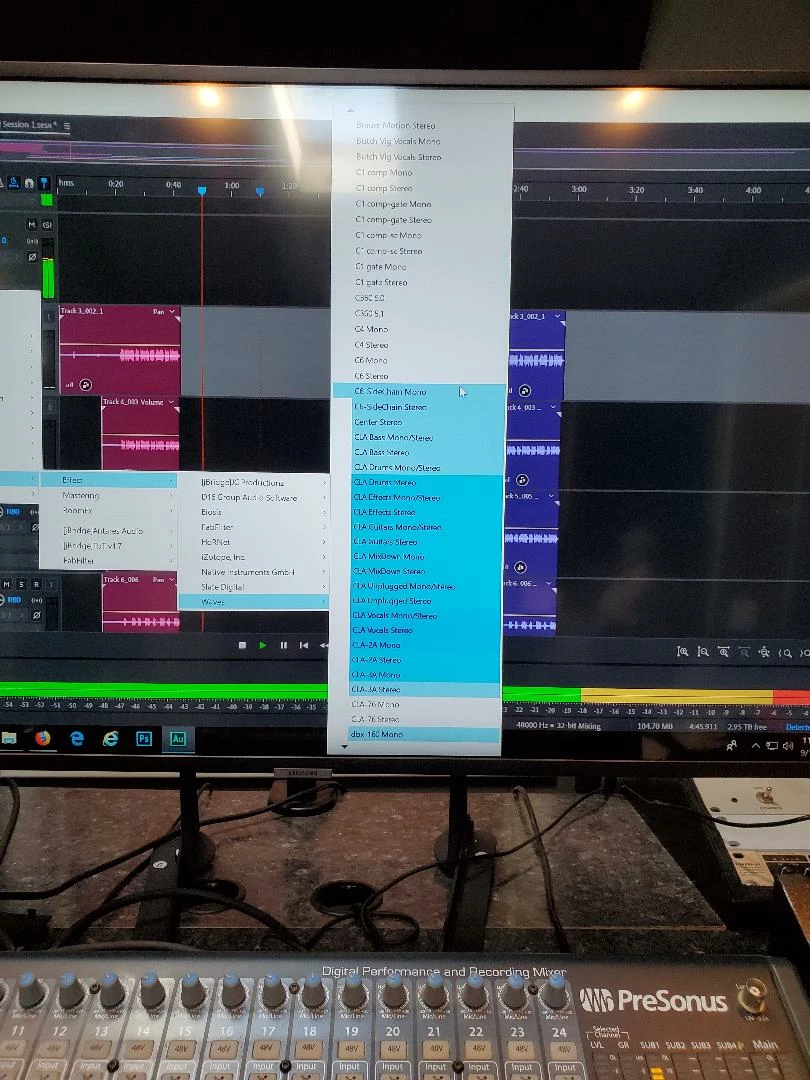
for some reason when i scroll through my vsts, it highlights them all..which is annoying because i cant see what i have selected unless i dbl and triple check where to mouse cursor is..anyone know why this would be happening? it didnt start until recently when i scanned my plugin folder...is there a setting in audition or what. ive included a screenshot
    This topic is closed to new replies. Start a new post to keep the conversation going.

    2 replies

    SteveG_AudioMasters_
    Community Expert
    Community Expert
    Sep 19, 2019 8:06 PM UTC

    I've no idea what's caused this to happen, but I can tell you that there are absolutely no controls that will affect this. What if effectively means is that you've made a selection of loads of effects! Can you still click on just one and select it?

    Translate
    D.M.P studio
    Known Participant
    Sep 23, 2019 1:01 AM UTC
    yea i can select just one. its weird, i just have to make sure the cursor is over the specific one i want since everyone gets highlighted. seems to only be an issue with my waves bundle. i think ill try re installing and see if that helps
    Translate