


Participant
Aug 25, 2022 4:05 PM UTC
Question

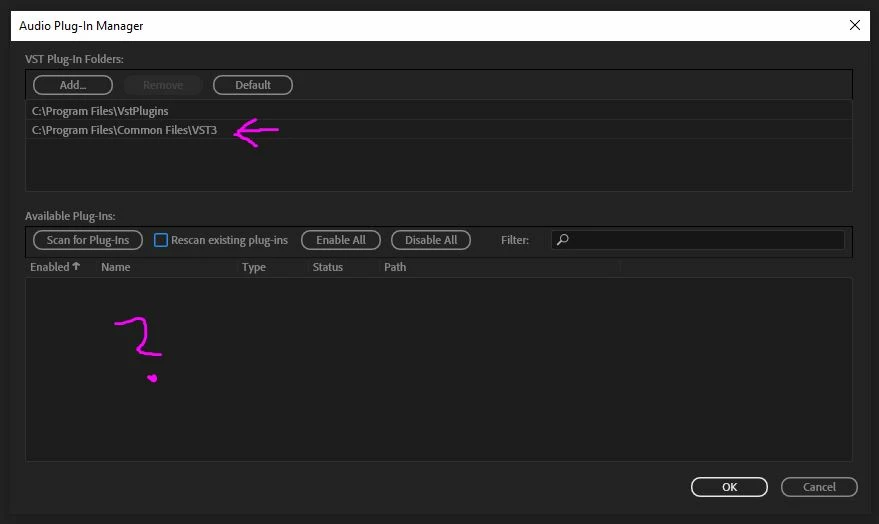
VST3 plugin not showing in the list. Is it Audition or the plugin that is the problem?

There is a VST3 plugin called NoisePalette made by SirenFX that doesn't seem to show up as a VST3 when I scan. Evne though I have set the correct folder it still it doesn't work. Is the problem with the VST itself or are there some issue with Audition? I got the plugin to show in DaVinci Resolve 18, but i need to get it working in Audition. The plugin itself is a noise generator.

It's a 64-bit plugin and their website is https://sirenfx.io/l/Sfnp
 

This topic is closed to new replies. Start a new post to keep the conversation going.

4 replies

SteveG_AudioMasters_
Community Expert
Community Expert
Aug 25, 2022 9:07 PM UTC

I don't think you've got the correct path set. It should be

C:\Program Files\Common Files\VST3\SirenFX

Translate
Participant
Aug 26, 2022 7:38 AM UTC

Right. Tried that, but the VST still doesn't show up. Must be something wrong with the plugin then i guess? But it's odd that it shows up when using DaVinci Resolve 18.


Translate
Legend
Aug 26, 2022 8:52 AM UTC

On looking at the product page for that plugin here at the top left corner of that page it is described as a Virtual Instrument Audio Plugin.  I think the answer to your problem lies in that description: VSTis (VST Instruments) do not work in Audition.

Translate
Participant
Aug 25, 2022 4:16 PM UTC

Forgot to add that I'm on Windows 10 / 64 bit


Translate