
tonym10561194
Participant
November 11, 2022
Question

Warnings or Errors when dynamically linking from Premiere Pro to Audition

  • November 11, 2022
  • 2 replies
  • 189 views

Hello -


I wish to mix the audio of my Premiere Sequence in Audition. 

I choose Edit -> Edit in Adobe Audition ->Sequence.


I select the following parameters in the screenshot below:
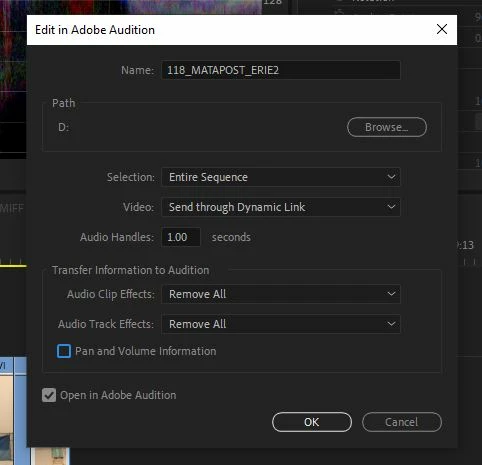
When it transfers to Audition it does seem to take a while for a sequence which is about 3:30 and then I am greeted with this message:
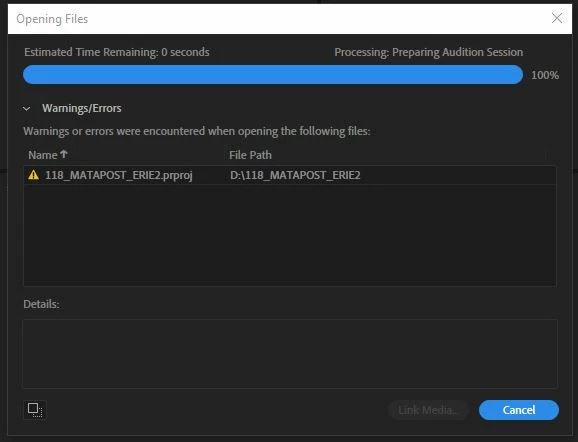
 

However, if I choose a clip from this same sequence and edit it in Audition everything works quickly and properly.


I have get this same warning/error with the other seqences in the project.

It does seem to be isolated to this PROJECT, however.  I don't get the error on sequences in OTHER projects. 


This topic has been closed for replies.

2 replies

Community Expert
November 12, 2022

Do you get the same error if you don't send the video by dynamic link?

tonym10561194
Participant
November 13, 2022

Yes.  Although it's much faster to get to that error and I also now can see the audio tracks in Audition.  I chose "None" under the video selection where Dynamic Link had been previously selected.

SteveG_AudioMasters_
Community Expert
Community Expert
November 11, 2022

Unfortunately the warning doesn't provide any details as to what has failed. But from what you've said, it appears to be a Premiere Pro project file that's faulty, not Audition. Audition has been known also to screw up session files, but in a 'round trip' exercise I would have thought that this wouldn't be an issue. Maybe ask on the PPro forum and see if others have experienced the same thing?