
Inspiring
November 3, 2016
Question

Waveform disappers and re-appears

  • November 3, 2016
  • 4 replies
  • 451 views

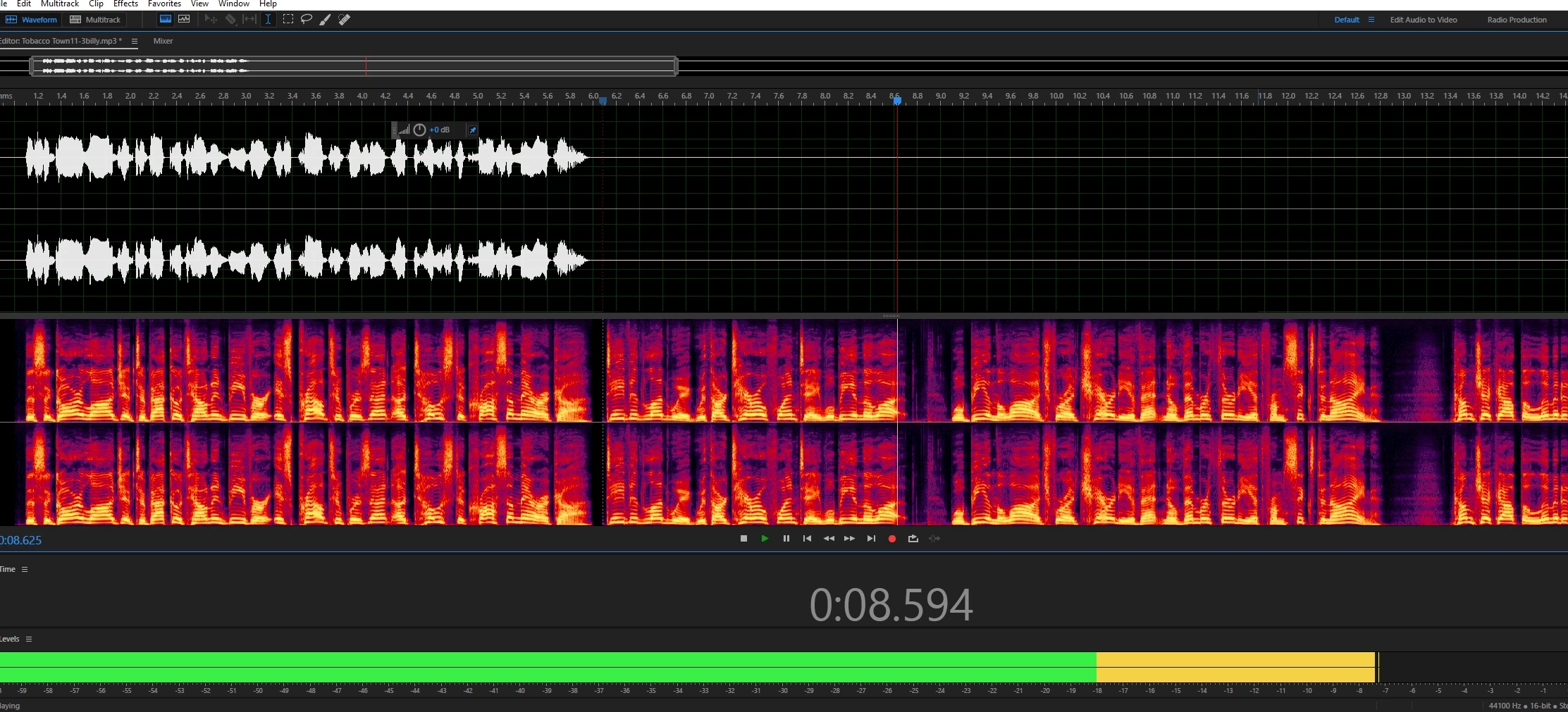
When I with edit with the new Audition 2017 (downloaded yesterday), my wave form - where there is clearly audio (see spectral display), is missing.  i hear it fine, but it tough to edit without seeing!  It also happens in the smaller (master waveform at the top).  I've updated my NVidia driver, restarted etc.
    This topic has been closed for replies.

    4 replies

    Participant
    November 5, 2016

    I am having this problem as well. It's almost as if something is wrong with the visual graphic display failing.... all I have to do to fix this is scroll in or out and it fixes it until I make another edit to the waveform.

    Participant
    November 4, 2016

    Found a work around.

    EDIT>Preferences>Keyboard Shortcuts>Type "Cut" in search box>Change "Cut" shortcut to the DELETE key.

    Participant
    November 4, 2016

    Unfortunately I am no help, for I am experiencing the exact same issue. This needs to be remedied quickly.

    Participant
    November 4, 2016

    To be specific, using DELETE to remove a portion of the audio file causes this problem.  Using CTRL-X doesn't.

    Inspiring
    November 3, 2016

    I'm experiencing similar issues.

    See here:

    Audition 2017 Waveform Bug

    -paul.