
donh9316555
Participant
June 29, 2018
Question

Waveforms in multitrack session no longer showing up

  • June 29, 2018
  • 1 reply
  • 1265 views

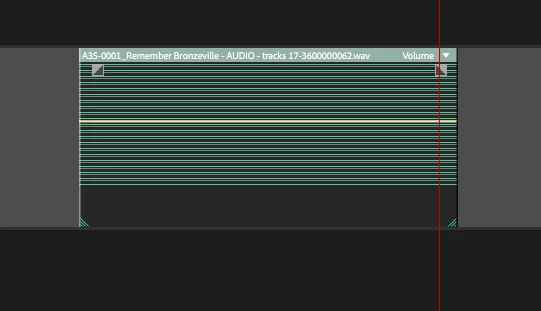
Today when I opened my Audition project to continue mixing, my clip waveforms all look like the attached picture.  Is there a waveform image cache in Audition I can try to toss and rerender?  Other suggestions?  The audio is there when I play through it.  Just can't see the waveform any longer.

Thanks.

Don Hertz
    This topic has been closed for replies.

    1 reply

    SteveG_AudioMasters_
    Community Expert
    Community Expert
    June 29, 2018

    Hmm... never seen it do that before! Which version of Audition are you running?

    But if it has done this to all of your waveforms, then I don't think it has anything to do with the waveforms themselves - it's far more likely to be a software malfunction of some sort. If you open another session, does the same thing happen? If you close Audition and restart it, does that make any difference?

    donh9316555
    Participant
    June 30, 2018

    I'm running Audition 11.1 on an iMac with OS 10.13.3.

    The project was originally sent over to Audition from Premiere as a multi-track project.  I feel like the small green lines shown in the image are showing me my entire list of tracks in Premiere instead of a single audio clip like it was just a few days ago.  Not sure what happened.  If I double click on any clip in the multitrack editor to load it up in Waveform view then I get the attached - which isn't the single clip but my entire track list from Premiere.  I've tried moving the cache folder to another location in an attempt to force the software to re-render but that didn't change anything.

    I may need to revert back to a previous save, but sure hate to lose a couple of days worth of work.

    Don

    SteveG_AudioMasters_
    Community Expert
    Community Expert
    June 30, 2018

    Interesting. If they didn't look like that when you had the session open originally, then somehow everything appears to have been saved as multi-channel files - which would certainly look like that when you open them in multitrack view. And if that's the case, then nothing you can do in terms of re-opening them is going to alter that. No I have no idea how that would happen, but I will also freely admit that I don't do round-trip stuff between Audition and Premiere either. I know that there are some constraints on this, and it's being actively developed, but it would probably help here if somebody who either does this stuff, or at least knows more about it could comment, as on the face of it, this doesn't quite make sense.