
Participant
July 31, 2018
Answered

What are the vertical white lines on track in multitrack? How do I hide?

  • July 31, 2018
  • 1 reply
  • 864 views

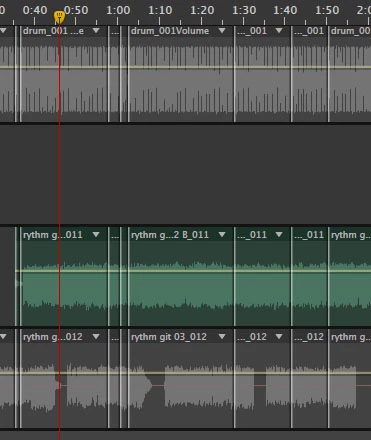
Hello all. I'm working in Audition CS6. I'm working on music in the multitrack window. I am editing the tracks and selecting the best takes. There are white vertical lines at seemingly erratic intervals while I edit. I find them distracting and not very useful. Especially as I don't know what they are or represent.

I have tried to find a way to hide/turn off but can't figure it out. I have tried a Google and forum search but had not luck.

I have attached an image. I'm talking about the white vertical line that cross each track.
Thanks

This topic has been closed for replies.
Correct answer ryclark

They certainly aren't at erratic intervals, they actually denote the start and end of all the audio clips that you have inserted onto each of your Multitrack tracks. You need them. So you cannot turn them off. But if you could you would be completely lost in knowing where all your clips were placed against the timeline in your Multitrack session. The only way that they will disappear is when you mix down the tracks to new files. But then you lose the ability to go back and move the clips and their in/out points around in the session.

1 reply

ryclark
ryclarkCorrect answer
Participating Frequently
July 31, 2018

They certainly aren't at erratic intervals, they actually denote the start and end of all the audio clips that you have inserted onto each of your Multitrack tracks. You need them. So you cannot turn them off. But if you could you would be completely lost in knowing where all your clips were placed against the timeline in your Multitrack session. The only way that they will disappear is when you mix down the tracks to new files. But then you lose the ability to go back and move the clips and their in/out points around in the session.