
Answered
What does "process" mean in “Effects” menu?
In “Effects” menu, some audio effects have the word "process", as follow:
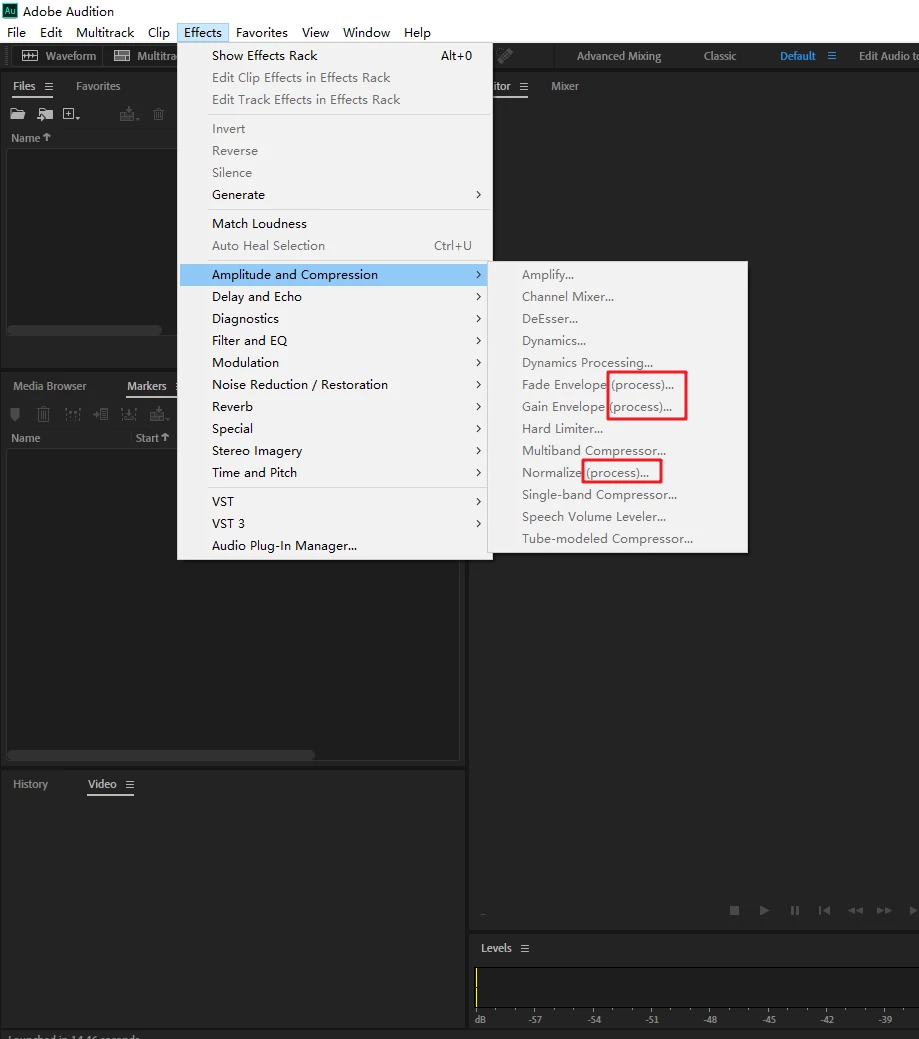
Question:
What does this "process" mean ?

In “Effects” menu, some audio effects have the word "process", as follow:
Question:
What does this "process" mean ?
Just to amplify that a bit... generally a process effect is one that's not suitable for real-time processing - either because it's processor-intensive or because it has to analyse what's there before applying it. Usually this applies to effects like Noise Reduction (the non-adaptive one). As SuiteSpot says, they're generally found in Waveform view. In the on-line help files (clue - these are easily searched using Google) it says:
'You can identify process effects by the word process in menu commands. These processing-intensive effects are available only offline in the Waveform Editor. Unlike real-time effects, process effects can be applied only individually, so they aren’t accessible in the Effects Rack.'
Already have an account? Login
No account yet? Create an account
Enter your E-mail address. We'll send you an e-mail with instructions to reset your password.


 AdChoices