james ca60449927
Known Participant
September 6, 2018
Answered

What's the green trace?

  • September 6, 2018
  • 3 replies
  • 435 views

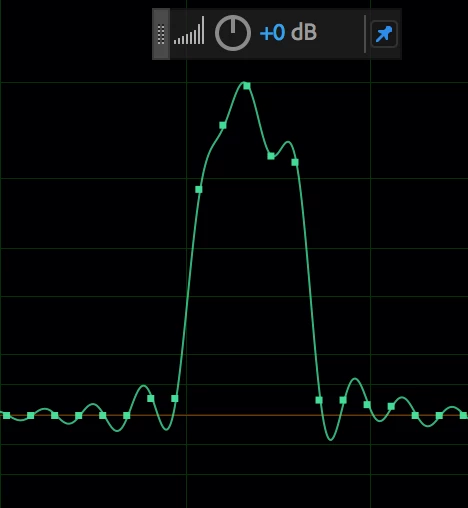
Here's a smalls segment of an audio signal showing samples and the usual continuous green trace. As you can see, the green trace oscillates in order to 'fit' the samples.

Can anyone tell me exactly, in detail, what the green trace represents? Is there a resource on this somewhere?

Thanks.

    This topic has been closed for replies.
    Correct answer SteveG_AudioMasters_

    https://forums.adobe.com/people/james+ca60449927  wrote

    What you're seeing, then, is a (re)construction of the analog signal from the available data, such that the (re)constructed signal is limited to the Nyquist frequency. It is, in other words, the best achievable analog representation of the data from the given digital bandwidth.

    1. Is this correct?

    2. Is a specific, precise, mathematical description of this available somewhere?

    3. ... an here my knowledge of digital audio (or the math behind it) is thin: Is it a unique representation, or does it represent certain choices made by the software--the choice of reconstruction filter? I think it is, because of Shannon/Nyquist, but would appreciate confirmation. 

    1.     Yes

    2.     Yes. Signal Processing, Modulation and Noise: Amazon.co.uk: J.A. Betts: Books does, according to John Watkinson, (from whom I've nicked a diagram).

    3.     I can probably explain a little more without getting too carried away...   but yes the choice of reconstruction filter makes a difference. What Audition does is actually easy to establish just by looking at the results you've given (and anyway I've tried this before, so I know it's true); Audition assumes an ideal set of filters. So what you are looking at whenever you do this is the impulse response of a phase-linear ideal low-pass filter.

    What it comes down to is this; Ideally it looks like a sin x/x waveform in the time domain. This waveform passes through zero periodically. So if the cut-off frequency is half of the sample rate, then the impulse passes through zero at the sites of all other samples. So if your picture above had a single sample displaced from zero, the voltage it represented would be that of the sample alone. Looks like this:
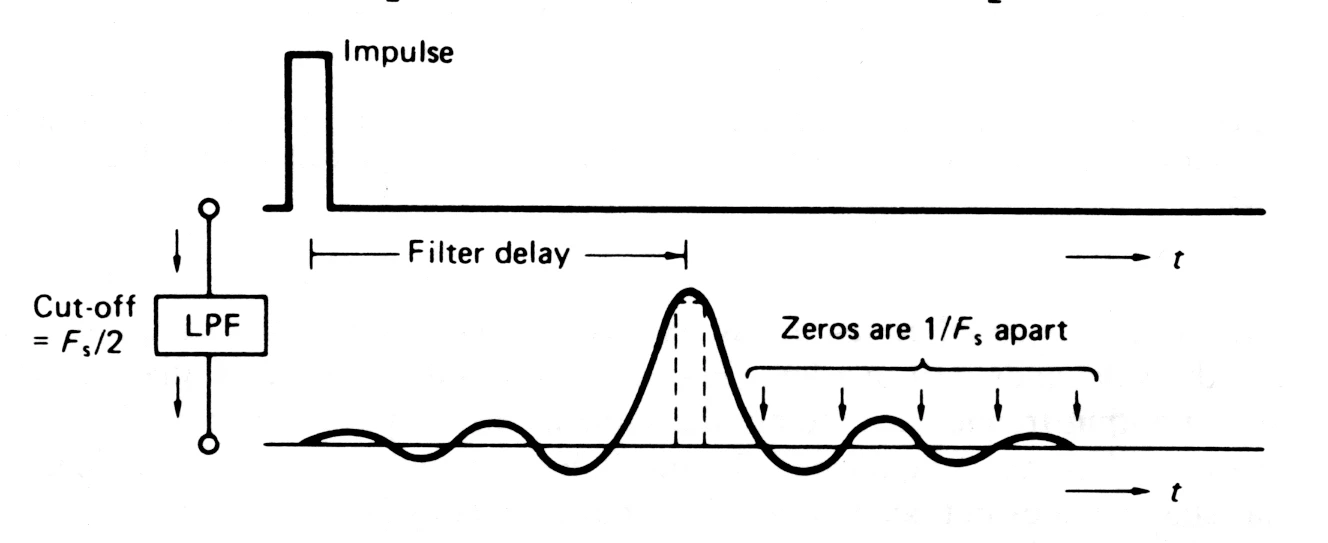
    But the continuous time output waveform has to join up the tops of all the input samples, and the rest are all zero. The implication though is that between the sample instants, the filter analogue output is the contribution from loads of impulses, as inevitably the output has to smoothly join the tops together, taking account of the direction of travel. But since the reconstruction filter on the output has the same characteristics as the one on the input, the output will be the same as the band-limited waveform before it was sampled. Which is actually why you never hear the effects of sampling...

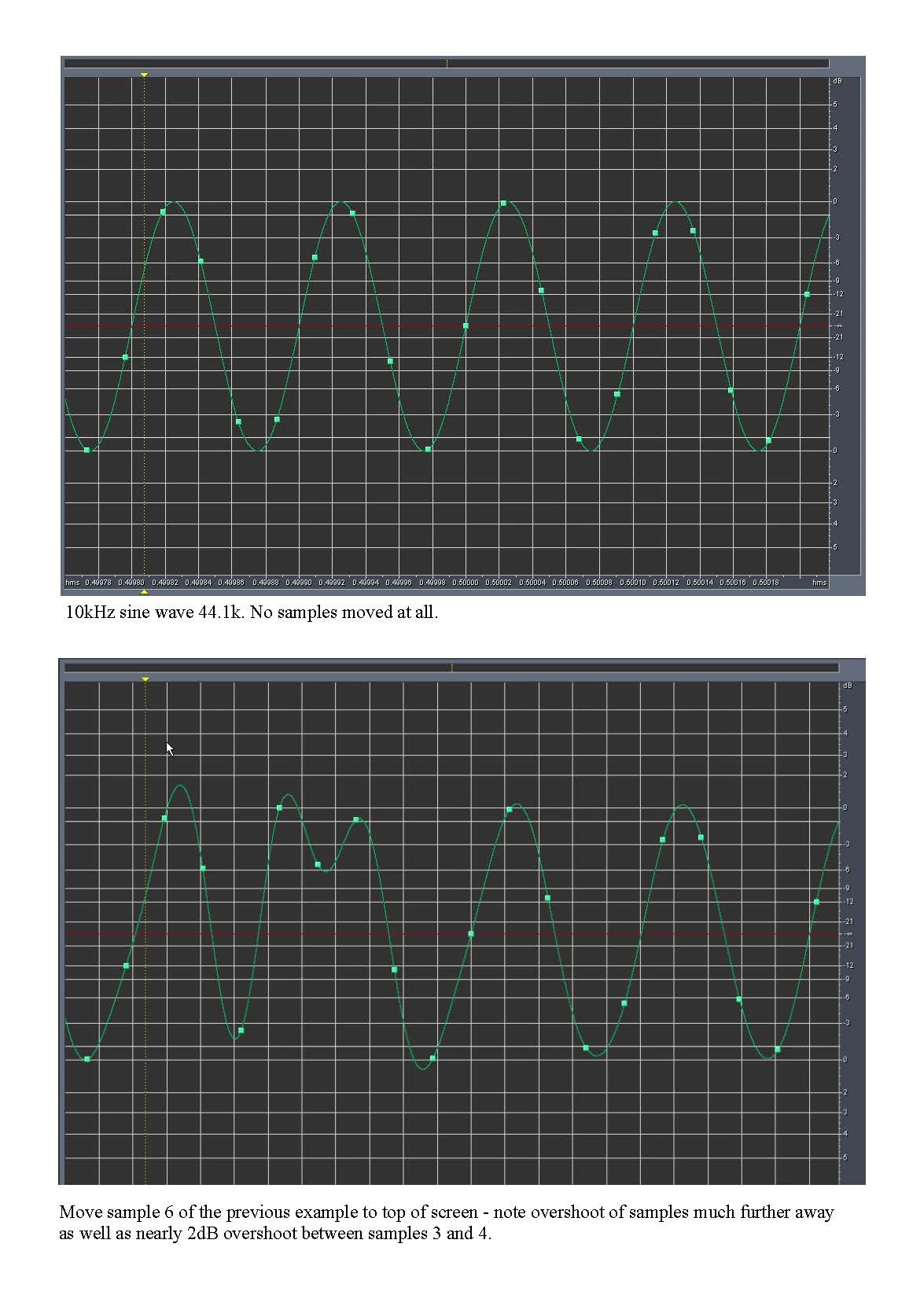
    There are implications to this - For instance, it's quite possible for a legitimate waveform to exceed 0dB quite comfortably. Years ago, when Audition also had the ability to move individual samples with a mouse, I created some waveforms that you really wouldn't want to encounter in real life, but which were all legitimate:
    3 replies

    james ca60449927
    Known Participant
    September 7, 2018

    ryclark, SteveG -- Thanks to both of you. Your answers are better than I had a right to expect, given the vagueness of the question. I'm familiar with Monty Montgomery's videos, but I'm not looking to understand digital audio better; I've got a solid grasp of that already. (Just FYI, I have a physics PhD and have been studying digital audio for a couple of years.) I'm hoping, I suppose, for a conceptual or even mathematical description of precisely what the green trace is in Audition. Both of you suggested an answer like this; I just want to push a little bit harder for more specificity and--ideally--some documentation that's specific to Audition.

    Maybe this will clarify things. I can create an audio signal consisting of a single sample at, say, -4dBFS (to choose an arbitrary amplitude). This would never result from recording anything--it would never be the output of an ADC. Still, the actual data is just one sample. If I display it in Audition, at sample resolution, I'll see the single nonzero sample, with that continuous trace passing through it, RINGING at or near the Nyquist frequency for the given sample rate.

    The data in the image above was synthesized in a similar way. It is not from a recording. It was created using a tool from BIAS PEAK, which I think is no longer available. The file is sampled at 384kHz, so the Nyquist is 192kHz. You'll notice that the "ringing" has a period of about 2 samples--so the "ringing" frequency is near have the sample rate, about 192kHz.

    The question then, is, precisely what is the green trace, mathematically?

    Here's what I think. I think your answers--to paraphrase, that it's a representation of the analog signal that would emerge from a DAC (am I interpreting correctly)--is, very likely, conceptually correct. The "ringing" is a result of the fact that the reconstructed signal is limited by the sample rate; only (audio) frequencies of 192kHz and below are available. (I know this is far above what people can hear; that's not important for my purposes.) That means, e.g., that there can be no sudden (at this scale) kinks in the reconstructed signal; the sharpest "edges" achievable are those achievable with a 192kHz sine wave.

    What you're seeing, then, is a (re)construction of the analog signal from the available data, such that the (re)constructed signal is limited to the Nyquist frequency. It is, in other words, the best achievable analog representation of the data from the given digital bandwidth.

    1. Is this correct?

    2. Is a specific, precise, mathematical description of this available somewhere?

    3. ... an here my knowledge of digital audio (or the math behind it) is thin: Is it a unique representation, or does it represent certain choices made by the software--the choice of reconstruction filter? I think it is, because of Shannon/Nyquist, but would appreciate confirmation.

    I do hope this makes sense.

    Thanks,

    Jim

    SteveG_AudioMasters_
    Community Expert
    SteveG_AudioMasters_Community ExpertCorrect answer
    Community Expert
    September 7, 2018

    https://forums.adobe.com/people/james+ca60449927  wrote

    What you're seeing, then, is a (re)construction of the analog signal from the available data, such that the (re)constructed signal is limited to the Nyquist frequency. It is, in other words, the best achievable analog representation of the data from the given digital bandwidth.

    1. Is this correct?

    2. Is a specific, precise, mathematical description of this available somewhere?

    3. ... an here my knowledge of digital audio (or the math behind it) is thin: Is it a unique representation, or does it represent certain choices made by the software--the choice of reconstruction filter? I think it is, because of Shannon/Nyquist, but would appreciate confirmation. 

    1.     Yes

    2.     Yes. Signal Processing, Modulation and Noise: Amazon.co.uk: J.A. Betts: Books does, according to John Watkinson, (from whom I've nicked a diagram).

    3.     I can probably explain a little more without getting too carried away...   but yes the choice of reconstruction filter makes a difference. What Audition does is actually easy to establish just by looking at the results you've given (and anyway I've tried this before, so I know it's true); Audition assumes an ideal set of filters. So what you are looking at whenever you do this is the impulse response of a phase-linear ideal low-pass filter.

    What it comes down to is this; Ideally it looks like a sin x/x waveform in the time domain. This waveform passes through zero periodically. So if the cut-off frequency is half of the sample rate, then the impulse passes through zero at the sites of all other samples. So if your picture above had a single sample displaced from zero, the voltage it represented would be that of the sample alone. Looks like this:

    But the continuous time output waveform has to join up the tops of all the input samples, and the rest are all zero. The implication though is that between the sample instants, the filter analogue output is the contribution from loads of impulses, as inevitably the output has to smoothly join the tops together, taking account of the direction of travel. But since the reconstruction filter on the output has the same characteristics as the one on the input, the output will be the same as the band-limited waveform before it was sampled. Which is actually why you never hear the effects of sampling...

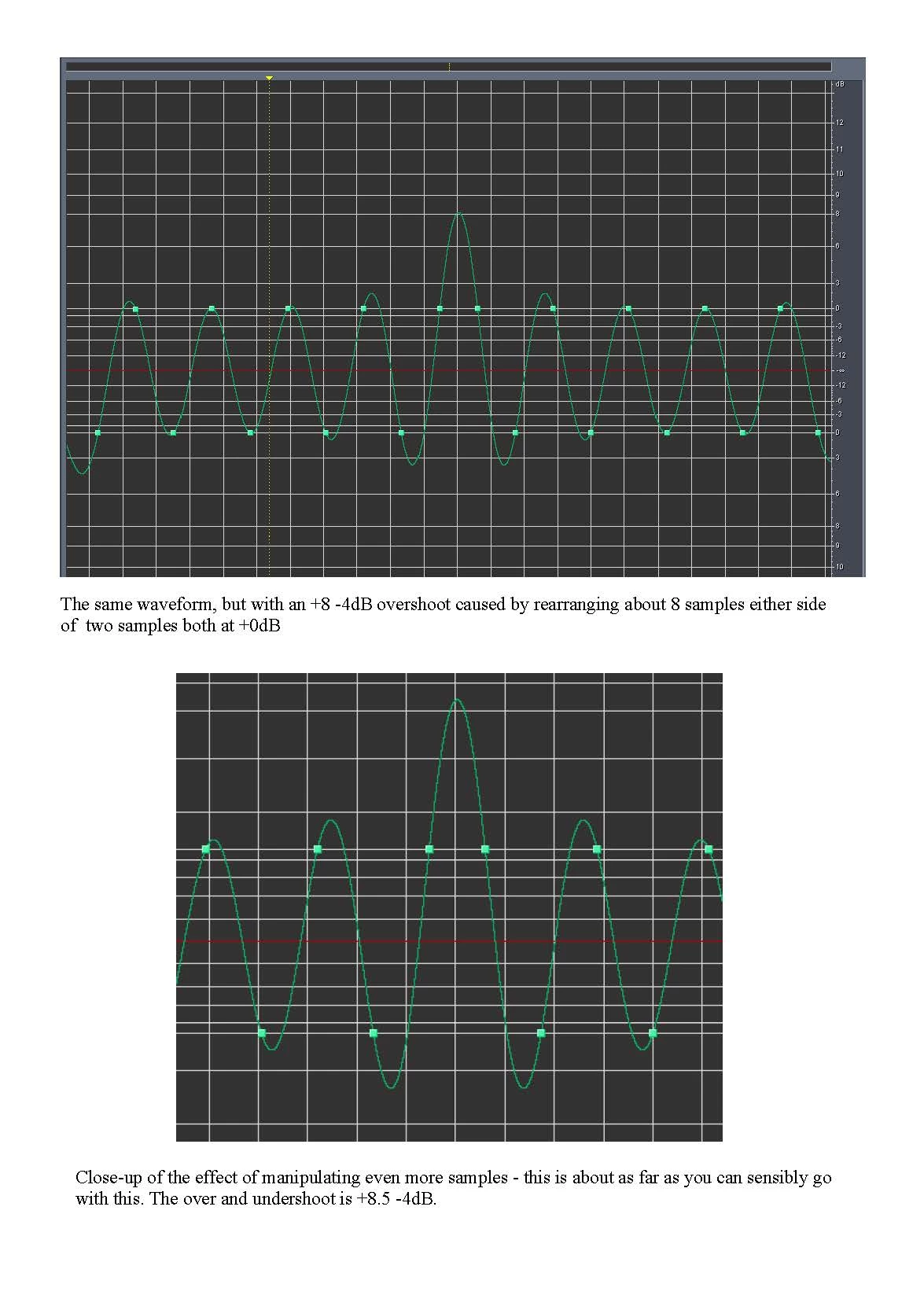
    There are implications to this - For instance, it's quite possible for a legitimate waveform to exceed 0dB quite comfortably. Years ago, when Audition also had the ability to move individual samples with a mouse, I created some waveforms that you really wouldn't want to encounter in real life, but which were all legitimate:
    james ca60449927
    Known Participant
    September 7, 2018

    Wow--thanks. I'm deeply impressed and sincerely grateful.

    Jim

    SteveG_AudioMasters_
    Community Expert
    Community Expert
    September 7, 2018

    The green trace represents what would physically come out of your sound device as an electrical signal. That line is technically an 'analogue' of it. Contrary to popular belief, digital audio isn't 'digital' at all when it's reproduced - it can't be, as in the real world, nothing can change instantaneously; what you actually get (ideally) is an accurate representation of what went in and was recorded. There are some caveats on this, the main one being that you can't record any frequency higher than half the sample rate, but other than that it works pretty darn well...

    You want a resource? I think that the best one I've seen was located by one of Audition's developers (CharlesVW) some while ago, and it's here: D/A and A/D | Digital Show and Tell (Monty Montgomery @ xiph.org) - YouTube Watch it and be prepared to be a little surprised!

    ryclark
    Participating Frequently
    September 7, 2018

    The green trace is the analogue representation of the audio signal as recorded and played back through your loudspeakers/headphones. It is what is integrated from the square dots, that represent the individual digital audio samples, when the digital audio is played out through your audio interface's DAC (Digital to Analogue Converter). Although it should be noted that looking at such a small sample of audio, less than 0.5 of a millisecond in this case, won't necessarily give you a true indication of what the audio content is. Probably in this case it is a very short 'click', ie. a digital tick or sample loss from the original signal. if you zoom out and listen to the audio you may be able to hear a click, which would also show up as a bright vertical line in the Spectral Frequency display. The smaller squiggly bits before and after the high peak are what is known as ringing, since an instantaneous change in audio level cannot be completely accurately represented by digital audio at any sample rate.

    Snap Steve.