
Participant
July 4, 2018
Answered

When recording in Audition CC, I get a clipping sound rather frequently, making the audio unusable.

  • July 4, 2018
  • 1 reply
  • 2490 views

As the title says, I am getting a clipping sound, despite the recording being well below the mic threshold. It makes any audio around it unusable, as I am saying sentences and sentences rely on making sense and therefore, need to be unedited.

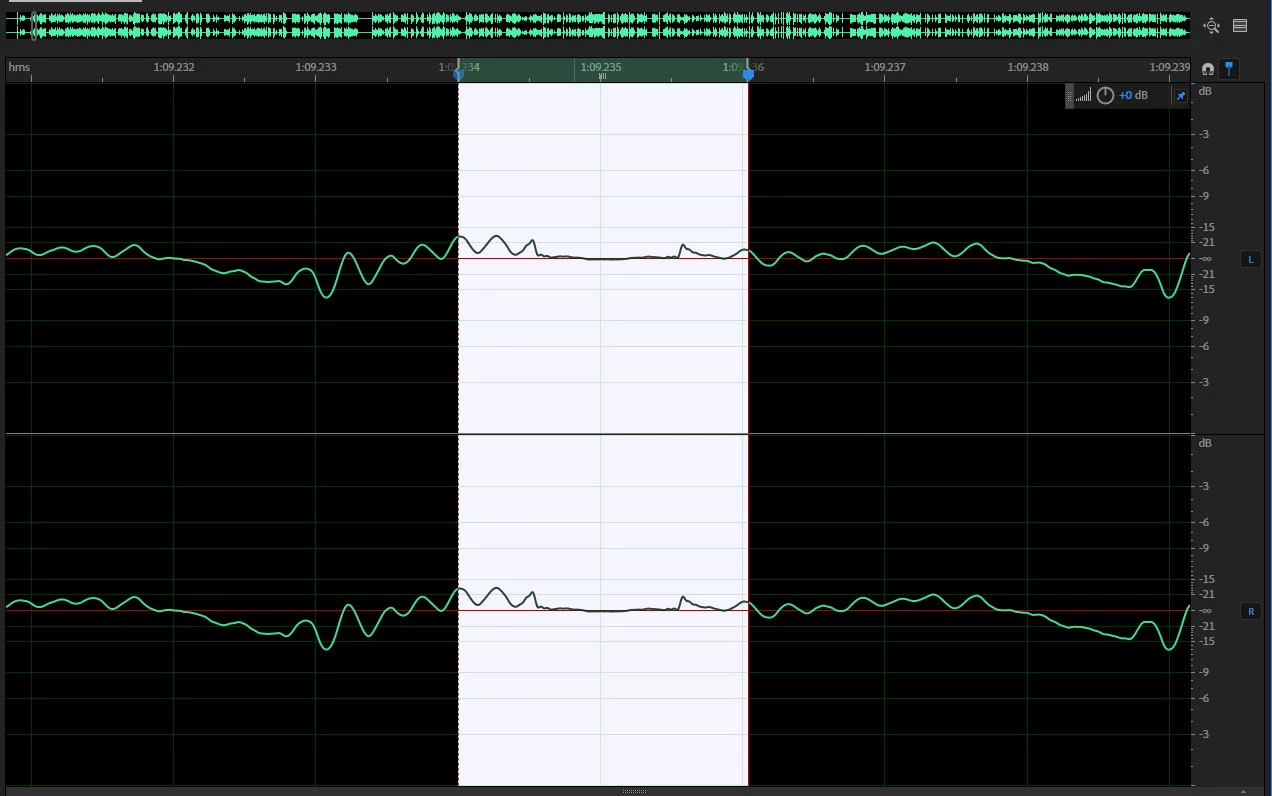
I have inserted a picture of the likely culprit (the waveform on either side is smooth, and this is a sudden "dip" to nearer 0dB - it is clearly some kind of "cut-off" in the mic's audio. The strange things are that this hasn't happened previously, only on this recording, and the waveform doesn't show it as flat - there is possibly some kind of voltage noise still being recorded.

My current theories are:

  • Some other process is momentarily interrupting the recording by some unknown method (unlikely).
  • There is some problem with the mic that is making it stop recording for a millisecond, causing an audible clicking sound (fairly likely)
  • This is a hardware problem with the USB connection to the mic.

My system specification, and Audition CC setup, is below. While recording, I am running a game which shouldn't be causing my system too much grief.

Recording

Mic: USB Blue Snowball iCE @ 48,000Hz connected to USB 3.0 on motherboard

Audition: 192,000Hz (This shouldn't cause a problem, it hasn't previously) single audio track, .wav format.

System

Motherboard: ASRock Z370 Pro4

CPU: i5-8600k@4.4GHz

RAM: 16GB

Recording HDD: Toshiba 3TB HDD

GPU: MSI Nvidia Geforce GTX 1060 6GB

Image of waveform
Message was edited by: Callum Munro, fixing bad grammar in title

This topic has been closed for replies.
Correct answer ryclark

Looks as if you are getting audio data drop outs in the audio stream. If the mic is only capable of 48kHz sample rate why are you recording at 192kHz. Apart from recording a lot of nothing into your much larger audio files something somewhere is having to do a sample rate conversion and that can't be good for your audio. Your recording settings for both Windows and Audition should match that of the USB mic since that is fixed.

Which version of Windows? Has it updated to 1803 recently? This has caused a lot of problems with audio. You may have to re-install any audio drivers that you use.

1 reply

ryclark
ryclarkCorrect answer
Participating Frequently
July 4, 2018

Looks as if you are getting audio data drop outs in the audio stream. If the mic is only capable of 48kHz sample rate why are you recording at 192kHz. Apart from recording a lot of nothing into your much larger audio files something somewhere is having to do a sample rate conversion and that can't be good for your audio. Your recording settings for both Windows and Audition should match that of the USB mic since that is fixed.

Which version of Windows? Has it updated to 1803 recently? This has caused a lot of problems with audio. You may have to re-install any audio drivers that you use.

Participant
July 4, 2018

The bad thing is, I knew not to record at a higher frequency than the mic can handle. It's just the setting Audition put in, so I used it. I'll correct that and see if it helps.

Oops, neglected to mention that! I'm on Windows 10, version 1803. I'll try re-installing my audio drivers, maybe that will help too. Thank you, I'll check this out and see if it helps.

ryclark
Participating Frequently
July 4, 2018

See this thread for the problem and cure some people have had with the 1803 Windows update. HELP!! MME device internal error...