



SayedH7
Participating Frequently
Sep 23, 2021 4:57 PM UTC
Answered

Where is the option in Audition to save as .sesx? It won't come up in the save as box under formats?
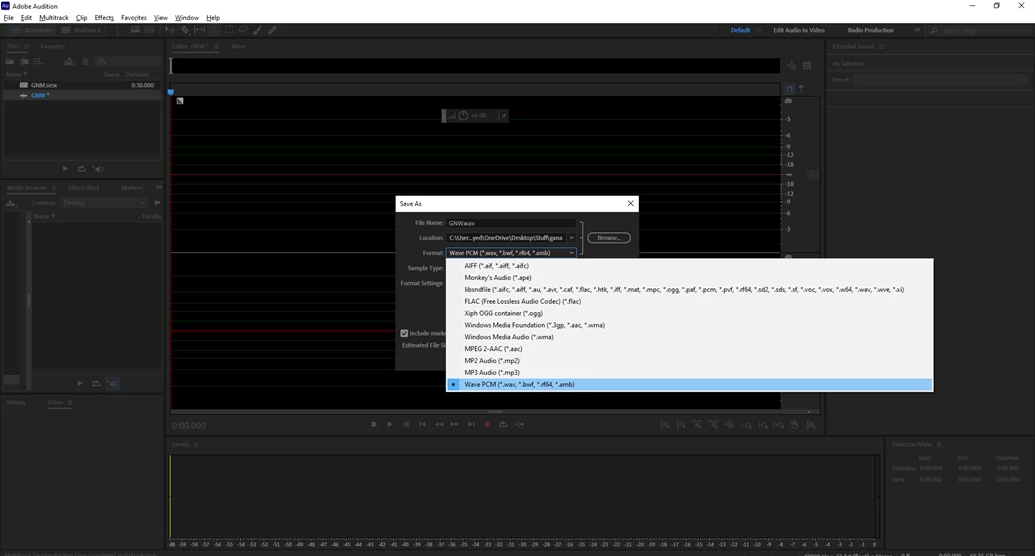


As the Subject says please help, in case this is useful I'm running on a legal version of the software, not a crack, I've opened it not too long ago so I don't know what I'm doing that much as I've only watched a 20 minute tutorial. It's on the latest version and updates. Please help.

 

This topic is closed to new replies. Start a new post to keep the conversation going.
SteveG_AudioMasters_
SteveG_AudioMasters_Correct answer
Community Expert
Sep 23, 2021 9:53 PM UTC

You can't do that! .sesx is a session file format, not an audio one. I suggest that you look at a few more tutorials, especially about Multitrack operations.

2 replies

SteveG_AudioMasters_
Community Expert
SteveG_AudioMasters_Community ExpertCorrect answer
Community Expert
Sep 23, 2021 9:53 PM UTC

You can't do that! .sesx is a session file format, not an audio one. I suggest that you look at a few more tutorials, especially about Multitrack operations.

Translate
SayedH7
SayedH7Author
Participating Frequently
Sep 26, 2021 4:54 PM UTC

Thank you, stupid question sorry should've looked more carefully.

Translate