
Participant
July 3, 2018
Question

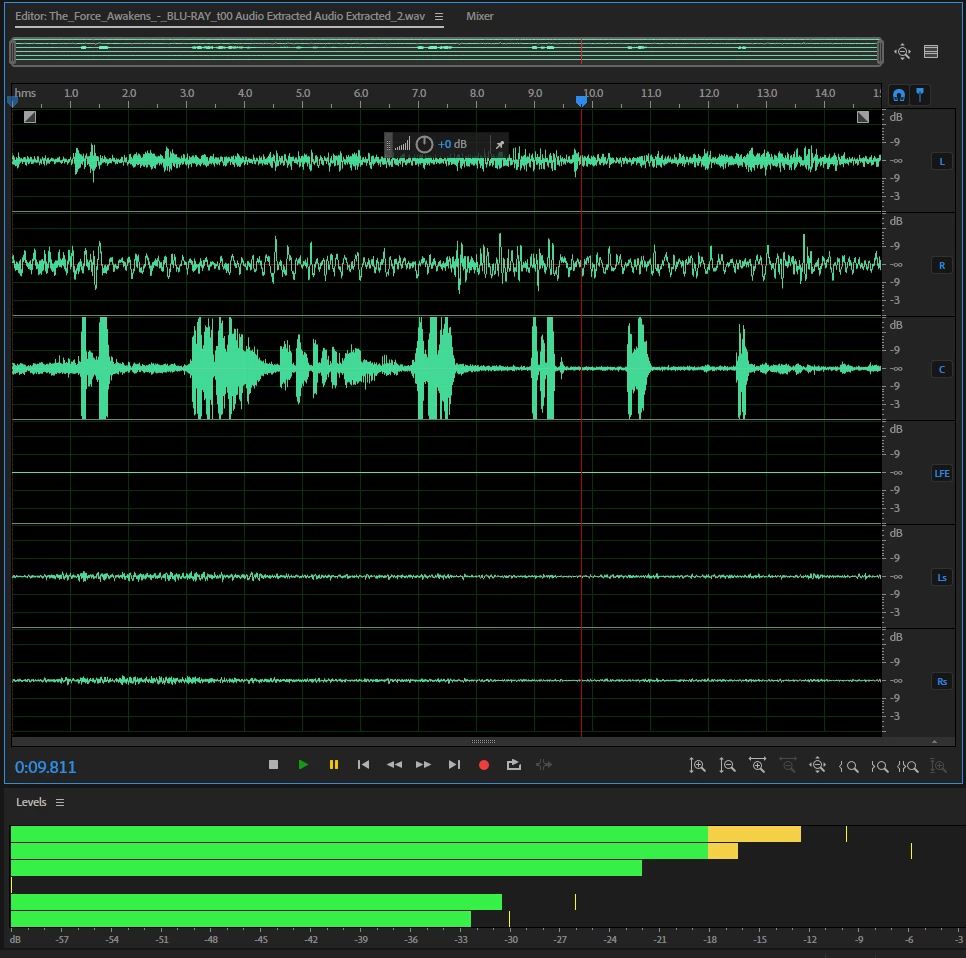
Why can't I hear the center channel for this audio clip?

  • July 3, 2018
  • 1 reply
  • 1767 views

I exported the audio from a scene in Premiere to Audition, and when I play the clip, I hear every track except for the center one. As you can see from the image, there is a waveform in the center channel and it is appearing in the levels panel. Is this a problem with my speakers? I can hear the clip fine when I'm just playing the audio track from Premiere, so I don't think it's that. Any help would be appreciated.

Link to file: The_Force_Awakens_-_BLU-RAY_t00 Audio Extracted Audio Extracted_2.wav - Google Drive
    This topic has been closed for replies.

    1 reply

    SteveG_AudioMasters_
    Community Expert
    Community Expert
    July 3, 2018

    Can we see a screen-grab of your audio channel mapping in Preferences, and also how your audio hardware is set up in Audio Hardware? And come to that, what audio hardware are you using?

    Participant
    February 27, 2022

    airpods

    SteveG_AudioMasters_
    Community Expert
    Community Expert
    February 27, 2022

    Actually I've just realised that the reason is pretty obvious. You are playing the file in Waveform view, and in that view only channels marked L or R will play. If you put it into Multitrack view in a 5.1 session, you will hear more of it.