Dylan M Searle
Participant
Aug 21, 2020 2:00 PM UTC
Answered

Why won't my audio clips extend all the way?

I'm doing a sound edit on a video that I transferred over from premiere. For some reason, it won't let me extend the clips all the way to the end of the source audio. Why is it doing this?

Richard M KnightCorrect answer
Community Expert
Aug 21, 2020 4:41 PM UTC

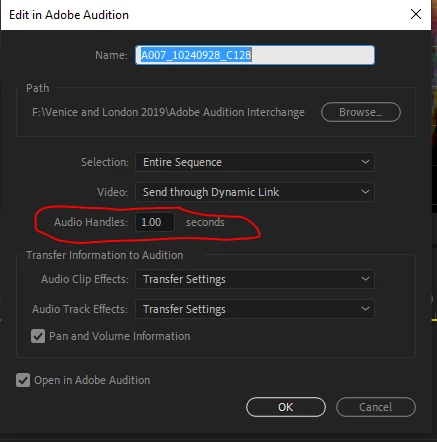
Not sure if this is your problem but when going from Premiere to Audition you specify the length of the audio handles that are added to each clip. As I understand it new audio files are created for all these clips with the chosen handle length so you don't have the full audio tracks available. These new extracted files are found in the Adobe Audition Interchange Folder.


2 replies

Richard M KnightCommunity ExpertCorrect answer
Community Expert
Aug 21, 2020 4:41 PM UTC

Not sure if this is your problem but when going from Premiere to Audition you specify the length of the audio handles that are added to each clip. As I understand it new audio files are created for all these clips with the chosen handle length so you don't have the full audio tracks available. These new extracted files are found in the Adobe Audition Interchange Folder.


Translate
Dylan M Searle
Participant
Aug 22, 2020 1:28 PM UTC

That is probably it. I didn't know it created new files. Thank you.

Translate