


Participant
Apr 5, 2022 10:35 AM UTC
Question

Workspace has become three separate sections

I am using Audition 3. My workspace displays the waveform in 3 separate sections. On the left is the waveform of the first 10 seconds and on the right, the last 10 seconds and in the centre the entire waveform. I can't work with this workspace, how do I restore the conventional simple view of the waveform?

I would be grateful for any advice you could give me.
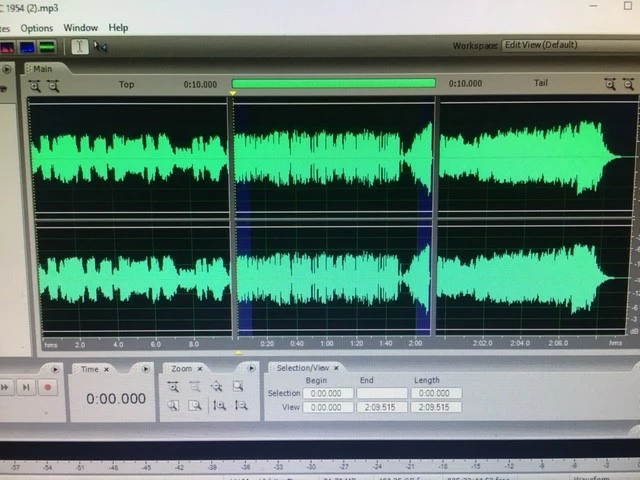
Here's a screenshot.

This topic is closed to new replies. Start a new post to keep the conversation going.

2 replies

SteveG_AudioMasters_
Community Expert
Community Expert
Apr 5, 2022 1:23 PM UTC

Go to View menu and take the check out of 'Top/Tail Views' - just restoring the default won't affect that part of the display, so it will remain divided until it's removed.

Translate
Legend
Apr 5, 2022 11:28 AM UTC

Have you tried resetting it via Window>Workspace>Edit view (Default), shortcut Shift+f10?

Translate