
Inspiring
February 6, 2019
Question

Zoom Into Waveform Not Working Audition 2019 12.0.1.34

  • February 6, 2019
  • 1 reply
  • 863 views

Zooming into waveform single track: No shortcuts work, mouse wheel scroll to zoom does not work.

Demo in video shows 2017 version working fine, switches to 2019 to show it not working.

The whole 2019 interface and action is slow and jittery.
The amplitude zoom works but no the waveform zoom in.

This topic has been closed for replies.

1 reply

55878965Author
Inspiring
February 6, 2019
Your case number: ADB-5733680-K1V3
Chat is currently unavailable. Please contact us during our business hours. If you receive this message during business hours, please try again.

Thanks for contacting us. We’ll find a representative for you to chat with and keep you posted on your wait time.  
This chat will become active once a representative responds.

Did you know you can get answers to most of your Adobe-related questions at help.adobe.com? Find helpful video tutorials, tips for troubleshooting, and user guides for all our products. You can even get answers from members of our vibrant forums community. Visit help.adobe.com. Please hold for the next available agent.

You are now chatting with Divya .
Please don’t close the chat window or browser tab since it will end our chat session. 

10:57:12 AM

Divya


Hello. Welcome to Adobe Technical Support.

10:57:38 AM

Richard


hi

10:58:12 AM

Richard


Your file was successfully uploaded.

10:58:20 AM

Richard


Attached is a log file.

10:58:22 AM

Divya


I understand you are facing issue with Audition. Let me help you with that.

10:58:44 AM

Divya


Okay.

10:58:50 AM

Divya


Let me check.

10:59:27 AM

Richard


Main problem is no zoom function.

10:59:53 AM

Divya


Okay. Let me check.

11:02:14 AM

Divya


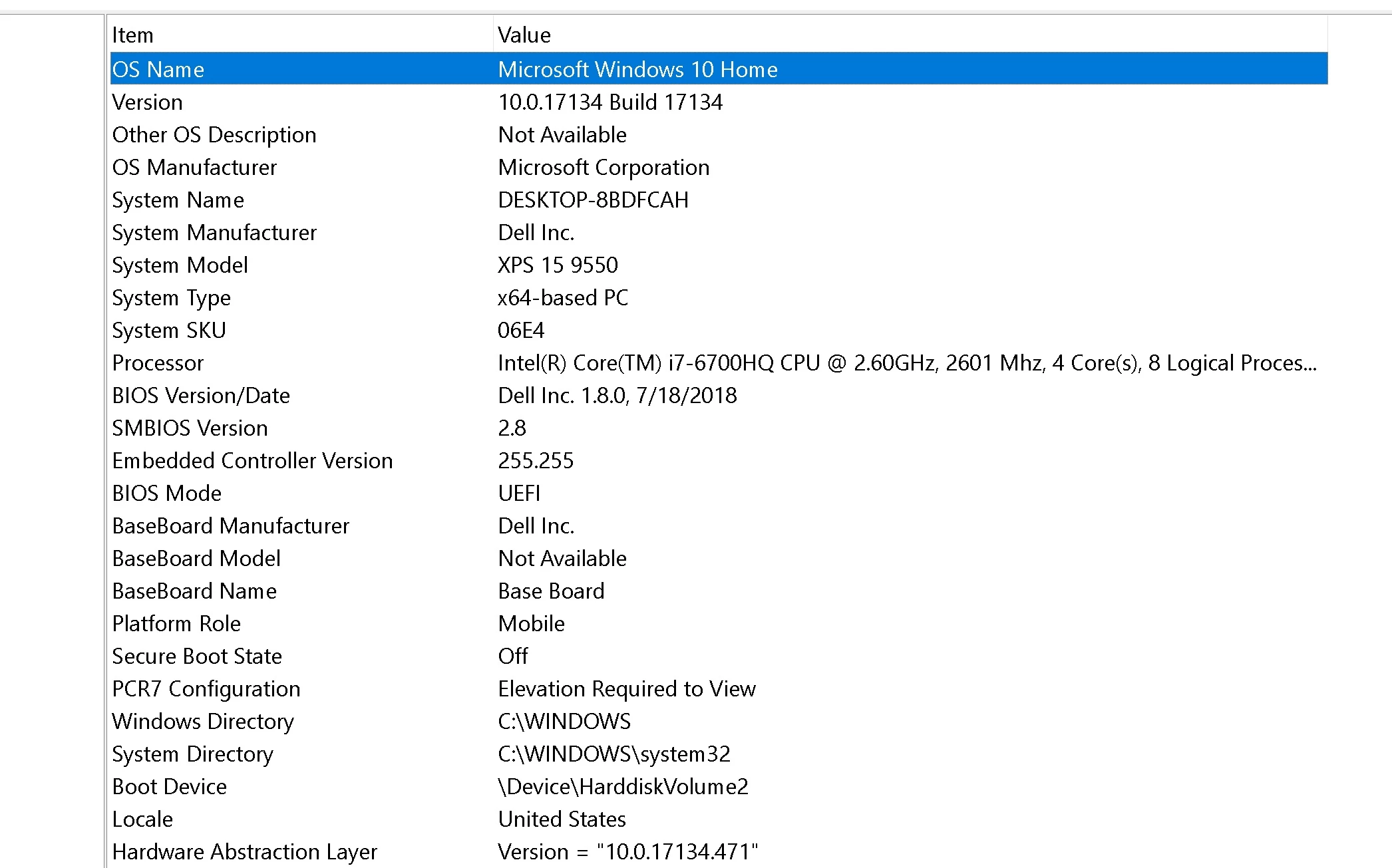
Richard, before we proceed further could you please help me with your system specification like OS, RAM, GPU and PROCESSOR.

11:04:10 AM

Richard


Your file was successfully uploaded.

11:04:13 AM

Richard


I am uploading a screen capture to demo the problem,. it will take some time to upload, and I will be away. Please email send me a link where I can open a bug report.

11:04:41 AM

Richard


attached is a screen shot of sysinfo

11:04:46 AM

Divya


Thank you. let me check it.

11:12:23 AM

Divya


Can you please help me which version you are facing issue?

11:16:26 AM

Divya


Are we connected?

11:17:26 AM

Divya


Are we still connected?

11:23:46 AM

Divya


We're sorry but since we have not heard from you we will close this chat. Please contact us again if you still need to talk to a member of our team.

Thank you for contacting Adobe Customer Care.
Your chat session has ended.   

Thanks for contacting Adobe.
Visit our forums. Post questions and get answers from experts 24/7
SteveG_AudioMasters_
Community Expert
Community Expert
February 7, 2019

In the General tab in Preferences there's a checkbox to switch hardware acceleration on or off.  Whatever it's currently set to,  try the other position and see if that makes any difference...

55878965Author
Inspiring
February 8, 2019

SteveG

Hardware Acceleration unchecked.

I checked (enabled it) restarted and the system interface response became worse.

From Reddit:

Thanks. The video helps. The buttons themselves are disabled or unresponsive. And the sluggishness in drawing overall. I’ve asked the engineering team about it and will follow up as soon as I have some info. There were some changes to better support Direct2D acceleration on Windows, but depending on the hardware or OS version, there may be some incompatibilities. Let me get the details and we can see if disabling it speeds things up. (diggum 1 point 23 hours ago )