


flyrs88
Known Participant
December 16, 2014
Question

Camera Raw 8.7.1 color issues

  • December 16, 2014
  • 39 replies
  • 21788 views

After the recent camera raw update to 8.7.1 I have noticed some pretty bad color shifts between camera raw and photoshop cs6. The colors in camera raw look very saturated and then when moving into photoshop the saturation shift is pretty dramatic. I never had these issues before the update. I have attached a screenshot illustrating the color issue. I am working on a very good monitor ( NEC PA 242W ) and it is color calibrated using NEC Spectraview calibration system. I have double checked my color setting in photoshop and camera raw to make sure I was viewing the same color space. I am just wondering if this is maybe a bug in the update and others are experiencing the same issues or if I am just missing something.
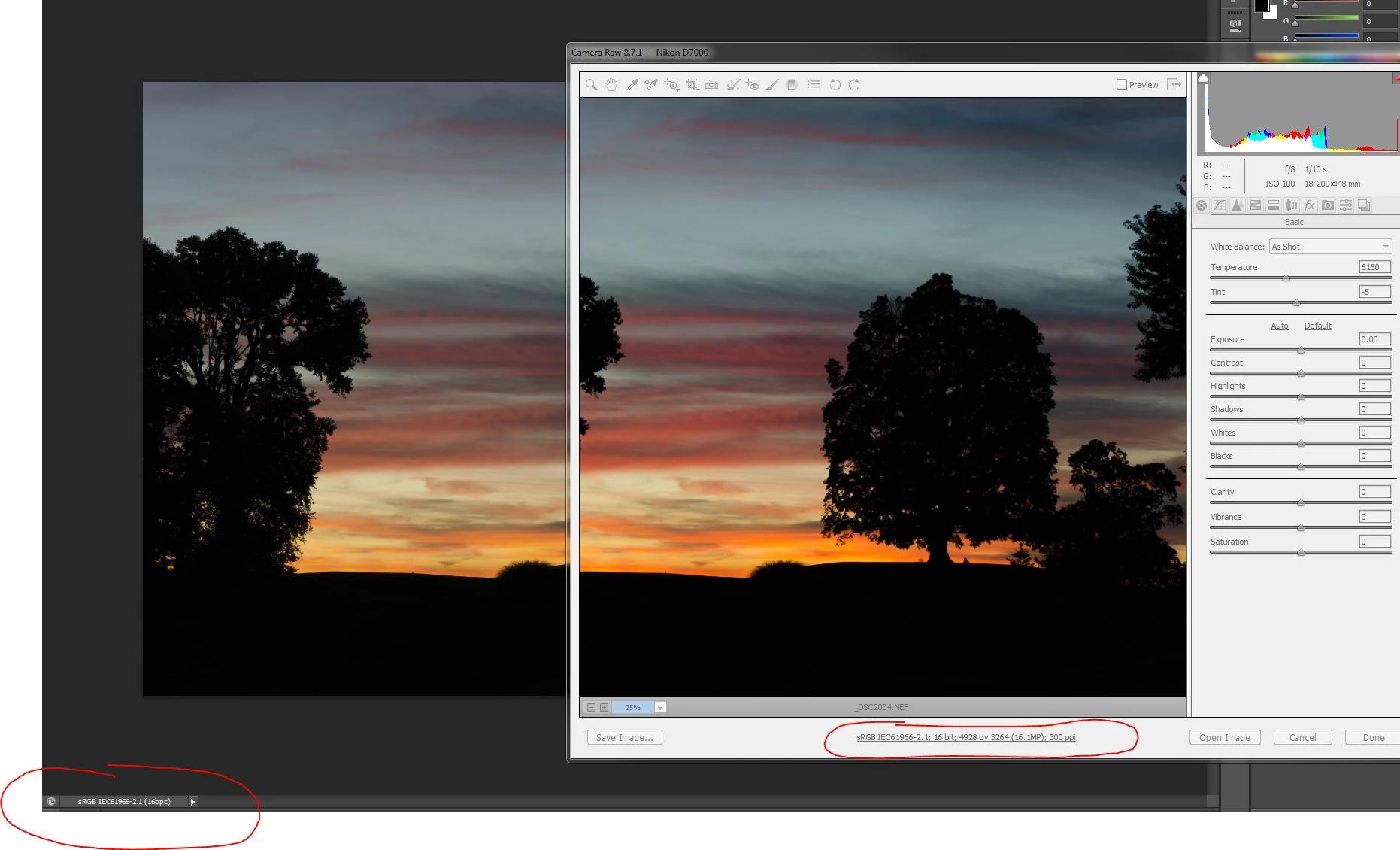
I would also add that I am using the Creative Suite CS6 and not CC. If that makes a difference.

    This topic has been closed for replies.

    39 replies

    Participating Frequently
    August 30, 2017

    I had the same problem. My machine has 2 display adapters. One intel on the motherboard and one NVidia.

    After reading a lot of blogs and facing the same problem and trying many things last month, I disabled the intel graphic card from my windows device manager and the colors are now perfect in bridge, Ps CC and Camera raw.

    Apparently Camera raw is selecting the default graphic card for profile.

    Not sure what will happen on restart but for now sorted.

    Using CC 2017

    Camera raw 9.12.0.784

    Alienware laptop with an EIZO monitor CG247

    Hope that helps.

    D Fosse
    Community Expert
    Community Expert
    September 4, 2017

    Yes, using Photoshop with two separate (and different) video cards is well known to be problematic. Adobe explicitly warns against it, and the recommendation is to disable one of them.

    And as I said above, this thread is a mix of several unrelated issues, all jumbled up into one confusing mess. Future readers of this thread should try to keep these sub-plots separate (if that's possible).

    Participant
    January 31, 2017

    I have the same problem with camera RAW 9.1.1.

    I have the following setup: Asus ROG laptop with Intel HD4600 (+ NVidia 8600M GT) graphics, i have an external Dell UP2716D monitor connected via DisplayPort.

    The Intel video card seems to have dual LUT's since i am able to set different icc profiles for my screens.

    I did a quick test:
    1) Set my SECONDARY monitor profile as laptop screen profile
    2) Open the image in ACR on the secondary screen - colors are now correct

    This proves that that ACR is unable to detect the screen it running on and is using the incorrect video LUT.

    Therefore, this is clearly a bug in Adobe SW and needs to be fixed!

    D Fosse
    Community Expert
    Community Expert
    February 1, 2017

    OK, but just because I'm in the mood for splitting hairs today, I'd like to point out that you're confusing monitor calibration (video LUT) with monitor profile.

    The calibration is a global display adjustment that affects anything displayed on that screen. It's the same as fiddling with the color control settings in the video card - if you could do that with the required precision you'd get exactly the same result.

    The monitor profile doesn't adjust anything, it's just a description of the display's response in its calibrated state (but much more accurate). It's a standard icc profile, used in a standard profile conversion from source to monitor. This is where the problem is - because if the profile is incorrect, or the wrong one, the application displays incorrectly.

    Just so we keep the concepts straight.

    But yes, the problem is real and reported several times before.

    November 30, 2016

    You always see the problem in another user. The seller are always right for you. Ok

    For me Native profile gives this difference in shadows and in colors from ACR to Photoshop version 2 or 4

    And my Nvidia Ge Force 540M have a problems in ACR with all latest driver from Nvidia.

    I can run ACR and Photoshop without problems and bugs in my system only with Nvidia driver from december 2015 with AdobeRGB profile, ICC v.4 and with checked GPU.

    November 26, 2016

    After all. Reinstalling Nvidia driver from 1 December 2015!

    Recalibrate one more time my Monitor Dell with last Dell calibration software to AdobeRGB and to Native profiles.

    Check UGP. Work fine with AdobeRGB profile no difference in colors, no in shadows, no bugs with picture, no bugs with histogram.

    I have the same difference with colors and shadows with Native profile applying.

    I don't understand why it was difficult to know for people who working with..

    Uncheck GPU may be it was good suggestion, but I think you guys need to work in cooperation to preserve this things for non professional PC users

    D Fosse
    Community Expert
    Community Expert
    November 26, 2016

    OK. There seems to be a problem with the profiles written by the Dell calibration software then.

    Looking at your last screenshot above, it's clear that the right profile is being used (there are no general saturation shifts, as there would be with profiles for one standard and one wide gamut). The difference is that ACR shows excessive shadow clipping.

    So what it looks like at the moment, is that the Dell profile is defective/corrupt in some way. I'm not familiar with the Dell software (all I know is that it's made by x-rite), but make sure the software is set up to make version 2, matrix-based profiles - not version 4 or table-based. Both those two latter policies are more prone to errors.

    Although both of these end up in the same display profile, the source profiles are different (Adobe RGB vs. linear ProPhoto) - and so these are two different conversions. With a defective profile, one can work fine and the other fail.

    November 27, 2016

    Version 2 make some problems with Mozilla colors, perhaps the only browser that supports color management.

    I make one with version 4 and matrix-based.

    New drivers from Nvidia and new Photoshop with ACR at first don't work with old and new profiles from Dell and X-Rite.

    I prefer have the latest version of ACR with Photoshop and have old driver from Nvidia, if I have no choice.

    All old and new profiles from Dell and X-Rite works fine with other photographic software. Sorry to say this.

    November 26, 2016

    Now unchecking Use Graphic Processor help me to solving this 3 problems.

    Why this affects color and shadows I don't understand. This worked 3-4 moth ago.

    I will to install older Nvidia driver.

    November 26, 2016

    In Photoshop on display with AdobeRGB colors this is more terrible.

    November 26, 2016

    I think that three problems comes from the same one.

    After deleted calibration soft and all folders with and all previous created profiles I installed new soft Dell UltraSharp Calibration Solution make spatially for my Monitor and i1Display Pro calibrator  and calibrate my display in notebook to Native (appox. to sRGB) and Dell U2413 to Native and to AdobeRGB profiles.

    No change - the difference is visible, the bugs with picture and histogram persist. In older version of ACR I don't have this problem.

    Impossible to work with.

    November 26, 2016

    The problem come back after restart

    November 26, 2016

    I don't understand why, but 2 problems was a problem of calibration software from Dell.

    I recalibrated my monitor with standard i1Profiler program and I have no problems with colors, shadows and image with histogram bugs.

    D Fosse
    Community Expert
    Community Expert
    November 25, 2016

    OK. Can you set the Dell as primary display in the OS and try again? Most likely, ACR is using the profile for the main display even when it's on the secondary.

    Your second problem should be resolved by unchecking GPU from ACR preferences.

    I wasn't saying the Nikon profile caused this problem. What I am saying is that it's non-standard, an unknown entity and a wild card. As document profile, you should always use the standard profiles. I really can't see the need for it.

    As I said, this is a minor point - but when things aren't working as they should, the last thing you want to do is introduce unknown variables. You want a stable, predictable environment to isolate the problem.

    D Fosse
    Community Expert
    Community Expert
    November 26, 2016

    A post just before my reply #65 has been removed, thus rendering it more or less meaningless.

    I just skimmed through this whole thread, and it's a complete mess of at least two or three unrelated problems all mixed up. This is chaos.

    I suggest those here who still have unresolved problems start a new thread. Describe the issue as precisely as possible, what type of display, how many and how they are configured, how they are calibrated/profiled (if at all), and include comparative screenshots.

    This kind of "I have the same problem"-branching of a thread is common and perhaps unavoidable, but it usually just confuses the real issue. Very often it's not the same problem.