

Participant
September 1, 2022
Question

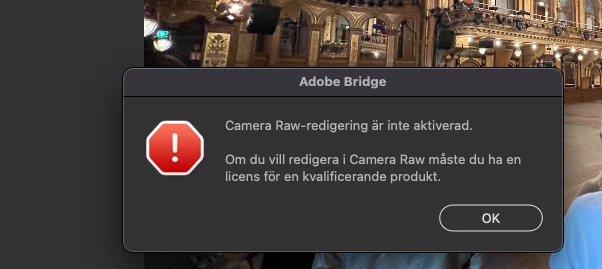
Unable to use Camera Raw
  • September 1, 2022
  • 3 replies
  • 158 views

 Hi, 

Camera Raw editing is not enabled? Worked fine yesterday & cant do anything at all today. Licensed & ok. Tried to restart everything including PS but no luck. Can anyone help me out here? thanks

This topic has been closed for replies.

3 replies

Participant
September 1, 2022

Hi there,

same problem here! Suddely Camera Raw does not start from Bridge. It works fine via Photoshop though...

Best regards, Peter

TheDigitalDog
Inspiring
September 1, 2022

Then this is a Bridge (hosting ACR) issue, you may need to ask in the Bridge forum or reinstall it from ACC. 

Author “Color Management for Photographers" & "Photoshop CC Color Management/pluralsight"
TheDigitalDog
Inspiring
September 1, 2022

Try resetting the Camera Raw preferences:
Hold down the Command key and select Photoshop > Preferences > Camera Raw (macOS) or hold down the Ctrl key and select Edit > Preferences > Camera Raw (Windows).
Click Yes in the dialog that asks "Delete the Camera Raw Preferences?"
See also:
https://helpx.adobe.com/camera-raw/using/camera-raw-settings.html 

Author “Color Management for Photographers" & "Photoshop CC Color Management/pluralsight"
Community Expert
September 1, 2022

This question would be better answered at Camera Raw forum. Moving it there

-Manan

-Manan