


Wiffleboy
Participant
July 9, 2020
Answered

A Calculator that Rounds

  • July 9, 2020
  • 2 replies
  • 667 views

I have created a calcuator using Captivate to help calcualte fees for our compnay.  The problem is I need to round it to the nearst dollar and I cannot for the life of me figure it out.  I know I will need to run a java script but does anyone have an idea on how to do this?  Below is my advanced action so I need to round the variable TotaltoDMV.   Any instructions you have is greatly appreicated. 
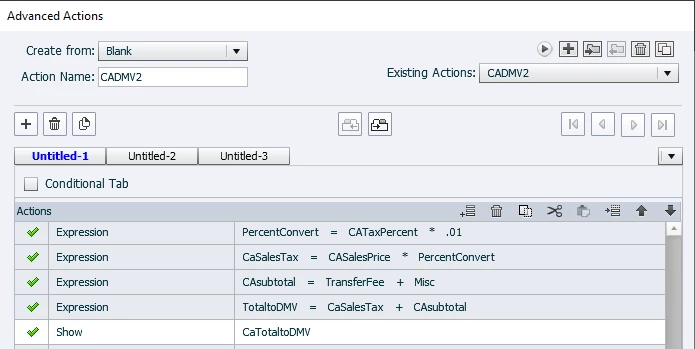
    This topic has been closed for replies.
    Correct answer Stagprime2687219

    You'll need to execute some JavaScript at the appropriate place in your sequence of expressions.


    For your JavaScript window...


    TotaltoDMV = (Math.round(TotaltoDMV));


    2 replies

    RodWard
    Community Expert
    Community Expert
    July 10, 2020

    If you happen to have the CpExtra HTML5 widget, then you have lots of options for rounding numbers and displaying values to a specific number of decimals.

    https://widgetking.github.io/cpextra/variables/command.html#xcmndround

    https://widgetking.github.io/cpextra/variables/command.html#xcmndroundto


    Stagprime2687219
    Stagprime2687219Correct answer
    Legend
    July 9, 2020

    You'll need to execute some JavaScript at the appropriate place in your sequence of expressions.


    For your JavaScript window...


    TotaltoDMV = (Math.round(TotaltoDMV));


    Lilybiri
    Legend
    July 10, 2020

    That is indeed the expression in JS. Of course I am NOT a JS expert but whenever I use JS in an advanced or shared action where variables are used which have been calculated in the advanced action, or their value needs to be changed I needed a lot more in the JS window. Maybe that has changed in the most recent version of CP?

    Totally agree with Rod that CpExtra widget is a perfect solution if you don't want to plunge into upgrading your JS skills (and for many other features which are lacking in Captivate like the grey highlighting of answers in question slides not taking care of the background color). Beware: it can be rewarding to learn JavaScript, it is just an alternative.

    Stagprime2687219
    Legend
    July 10, 2020

    I started using JavaScript in my Captivate projects with Captivate 9. I like to think of it as creating my actions manually. I have never needed to add much to make it work.

    The test is simple -  I made three quick buttons and a shape to display a variable that I called  myVar. Each button is set to Execute JavaScript and the code for each button is shown. It is that simple.

    One will set the value, one will round to nearest whole number, and one will round to two decimals.

    You'll need to clarify what you mean by warning others that JavaScript is an alternative that can be rewarding. I believe both statements are true but I guess I just don't understand why folks should  "Beware..."
