Known Participant
October 20, 2010
Question

A user experience for CP5(with 6 issues)

  • October 20, 2010
  • 1 reply
  • 991 views

Hi respected Adobe team,

I am a CP5 user for 2months. After using CP5 for a part of time, I got some user experience to share with you.

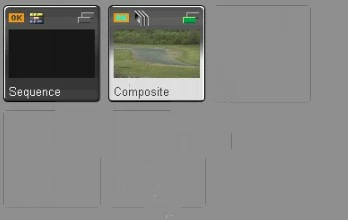
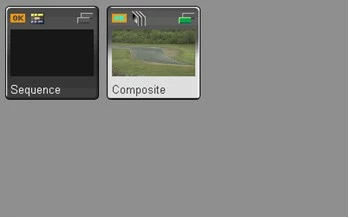
1. I published a CP project as a .swf with 1280*1024. When I watched this .swf as other dimension (except 1280*1024),some mess line will appear  in the video.

The video with mess line:
The correct video:
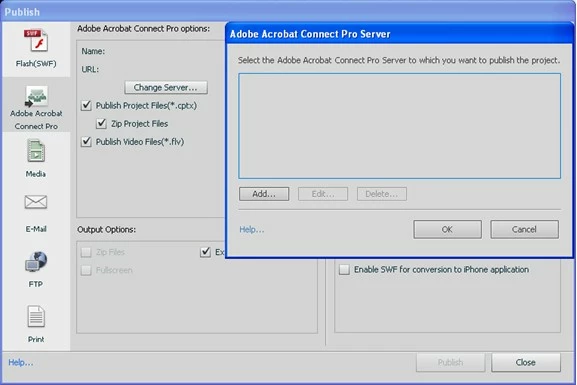
2. I think CP5 can publish CP project as a .flv, but I don’t know how to? In this window I don’t know how to add a server to publish .flv file. .flv file is very useful for me, so could you help me?
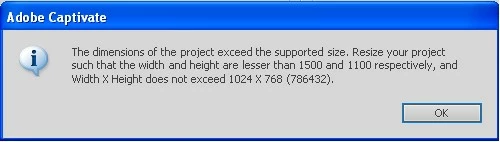
3. Why .f4v file’s dimension need less than 1024*768? If I had a 1280*1024 CP project and I wanted to publish it as a .f4v file, I have to compress this project. As the result of compress is mess lines appear in the video.
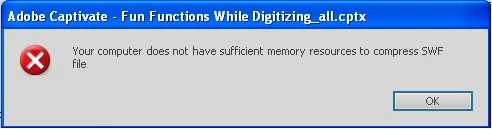
4. When I published a CP project as a .swf, sometimes this sentence appear (your computer does not have sufficient memory resource to publish your file).

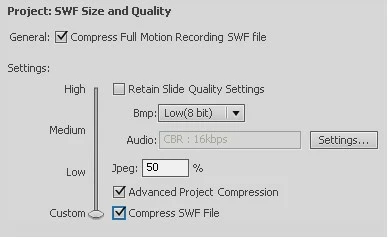
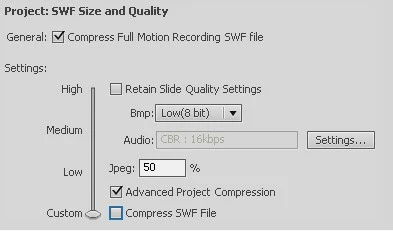
I had some information in this issue. This project was created in CP5. Whatever how long time I open this project, when I publish it this dialog will appear. In my opinion, if the CP project had a long time video (much video information), the chances of this dialog’s appear will grow up. But if I change some setting maybe this dialog will not appear.
In this setting the dialog appeared:
In this setting the dialog didn’t be appeared:
5. When I import a .swf to Adobe Flash Catalyst CS5, the .swf can’t be displayed normally. And I tried to analyze a .swf(about 2 min long) by a tool, the result is the .swf just have 37 frames. The strangest point is more than 90% video content is in the 35th frame. Other 36 frames almost have nothing. I don’t know why.

6. When I recording a long time video, CP cut the video as many slides automatically. Sometime it makes me a little uncomfortable.

In this CP project, I recorded this video at a heat. But CP cut it automatically (become 18 slides).

At last, I have an advice for CP. If we can modify the video part in every part, it will be great! Actually, I am a big fan for Adobe productions. So wish a better CP version (maybe CP 6?). Thank you!

My msn:longzhilin_long@hotmail.com

Glad to make friends with you!

    This topic has been closed for replies.

    1 reply

    Lilybiri
    Legend
    October 20, 2010

    Hello,

    Since your questions are for the Adobe team, will not try to answer. But this is not the way to contact the Adobe team, you are on a user forum, where Captivate users are trying to help other users. It happens that someone of the Adobe team pops in, but if you want to be heard by them, please fill in a bug or a feature request form/

    Lilybiri

    Known Participant
    October 21, 2010

    Hi Lilybiri,

    Thank your reply. That's a message for Adobe team,but if anyone can help me to solve those problem, I am very appreciate it.

    Best regards,

    Nick

    S_Ayyappan
    Participating Frequently
    October 22, 2010

    Hi Nick,

    I'm sorry to not ethat you are facing these issues with Captivate 5. While many of the issues you've reported probably have a workaround (I've listed some follow-up actions below), one issue we've had difficulty reproducing is the 'out of memory' issue when you publish. Can we schedule a conference call with a Connect session to investigate this further. Please mail me at- shamer at adobe dot com with details on the geo you are located in and some convienet time slots for the call.

    Regards,

    Shameer

    Adobe Captivate Team

    The other issues:

    >>

    1. I published a CP project as a .swf with 1280*1024. When I watched this .swf as other dimension (except 1280*1024),some mess line will appear  in the video.

    Can you check if this is an FMR swf (does the video camera icon appear on your Cp slides in the film strip/ thumnails? In that case there will be some lines observed with resizing.

    2. I think CP5 can publish CP project as a .flv, but I don’t know how to? In this window I don’t know how to add a server to publish .flv file. .flv file is very useful for me, so could you help me?

    You cannot publish the Cp project as an FLV. You publish as an F4V file. You then have to manualy upload this on to a streaming server (if that is what you are attempting).

    3. Why .f4v file’s dimension need less than 1024*768? If I had a 1280*1024 CP project and I wanted to publish it as a .f4v file, I have to compress this project. As the result of compress is mess lines appear in the video.

    This is a limitation from the way we use codecs for F4V. We are currently investigating this issue.

    6. When I recording a long time video, CP cut the video as many slides automatically. Sometime it makes me a little uncomfortable.

    In this CP project, I recorded this video at a heat. But CP cut it automatically (become 18 slides).

    We can look at this issue also in our connect session, but I believe your auto FMR might be getting triggered in some scenarios, hence the number of slides varies.